Document Settings
Document Settings in Fakturownia for Magento control the content, appearance, and accounting parameters of every invoice the module generates. In Magento 2, many of these settings support both global and store-view scope — a feature that is particularly valuable for multi-store Magento installations with different languages or markets.
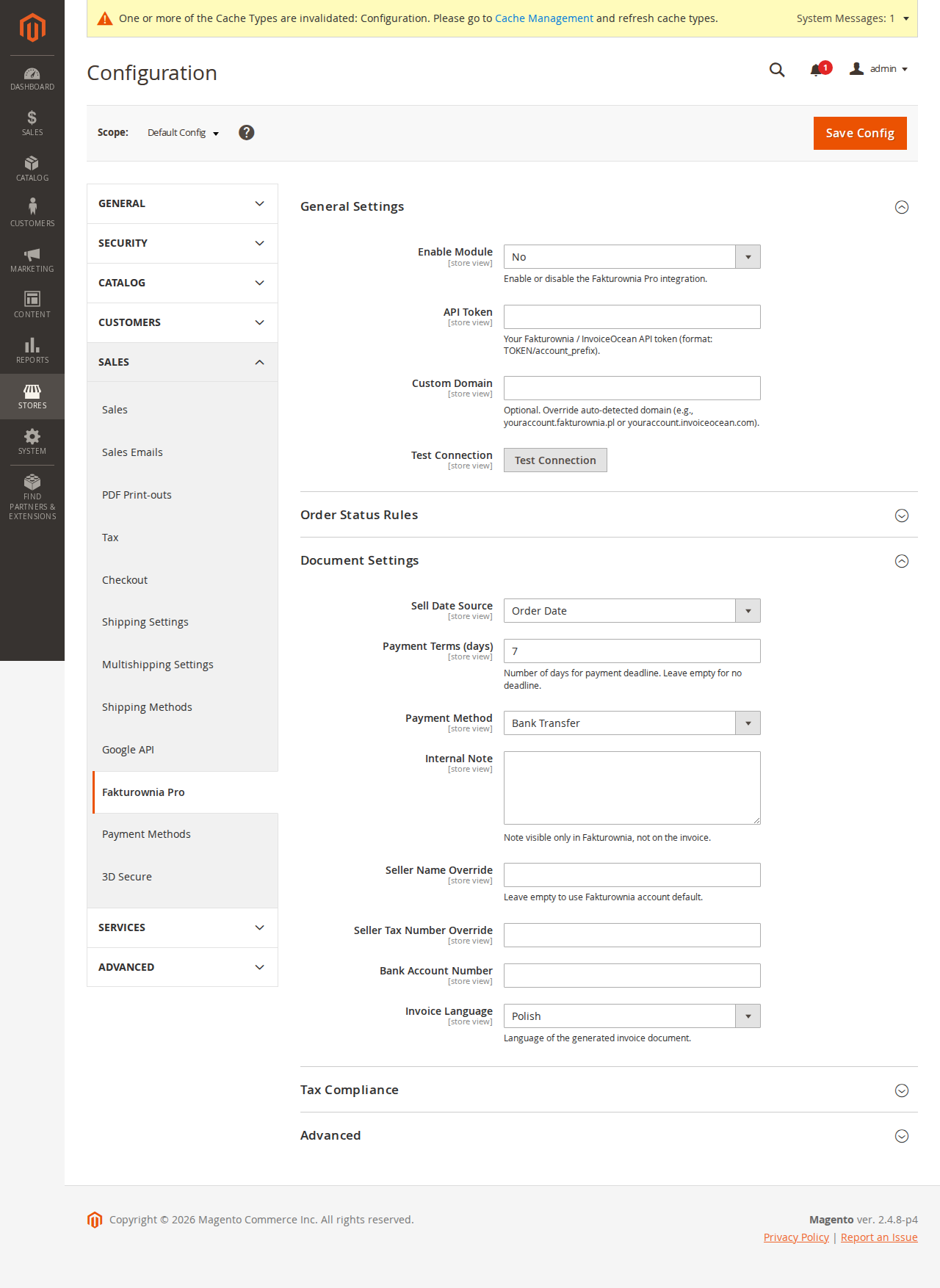
Accessing Document Settings
- In your Magento admin, navigate to Stores → Configuration
- In the left sidebar, find Fakturownia Pro → Document Settings
- Use the Store View scope selector at the top of the page to configure global defaults or per-store overrides
Store Scope Behavior
Global vs. Store View Settings
Most Document Settings can be configured at three levels in Magento:
| Scope level | Description | |---|---| | Default Config | Global fallback — applies to all stores that do not override this setting | | Website | Applies to all store views under this website | | Store View | Overrides global/website settings for a single store view |
To override a setting at the store view level:
- Select the store view from the scope selector
- Uncheck the "Use Website" or "Use Default" checkbox next to the setting
- Enter the store-view-specific value
- Save configuration (remember to flush the Magento configuration cache after saving)
Which Settings Are Scope-Aware
| Setting | Scope-aware | |---|---| | Invoice PDF template | Yes | | Buyer name format | Yes | | Sell date | Yes | | Payment terms | Yes | | Custom notes (before/after items) | Yes | | Seller name override | Yes | | Bank account visibility | Yes | | Shipping description | Yes |
Exchange rate source is a global setting — it cannot be overridden per store view.
Template Selection
Selecting an Invoice Template
- In Document Settings, open the Invoice Template dropdown
- Templates are loaded from your Fakturownia account
- Click "Preview" to download a sample PDF for any template
- Select the template and save
Per Document Type Templates
| Document type | Scope-aware | Separate template | |---|---|---| | VAT Invoice | Yes | Yes | | Proforma | Yes | Yes | | Credit Note | Yes | Yes |
For a Magento store with separate store views for Poland and Germany, you can use a Polish-language invoice template for the Polish store view and an English-language template for the German store view — the product names are in the respective language since they come from the Magento order.
Multi-Currency with directory_currency_rate
Magento 2's native currency system uses directory_currency_rate — exchange rates stored in the directory_currency_rate database table. These rates are updated by Magento's cron-based currency rate import (configured in Stores → Currency → Currency Rates → Import Settings).
How Fakturownia for Magento Uses Currency Rates
When generating an invoice for an order in a non-PLN currency, Fakturownia for Magento can use either:
- The Magento directory_currency_rate stored at order time — pulled from the order's
base_to_order_ratefield. This reflects the exact rate the customer saw at checkout. - A real-time NBP or ECB rate — fetched at invoice creation time. This is the rate required by Polish accounting law.
Recommendation: Use the NBP/ECB rate for accounting compliance. Use the Magento order rate only if your accountant specifically requires invoices to match the exchange rate the customer paid at.
Exchange Rate Source Options
| Source | Description |
|---|---|
| NBP Table A | National Bank of Poland mid-market rates (recommended for Polish VAT accounting) |
| ECB | European Central Bank reference rates |
| Magento order rate | base_to_order_rate from the order record |
| Custom fixed rate | Manually entered rate — updates only when you change it |
Rate Date Logic
For NBP and ECB: the rate used is from the last business day before the invoice creation date, per Polish VAT Act Article 31a.
For Magento order rate: the rate is frozen at order placement — no date logic applies.
Exchange Rate Display on Invoice
The invoice footer includes the rate used: "Exchange rate: 1 EUR = 4.2837 PLN (NBP, 2025-03-28)". This satisfies the Polish legal requirement for PLN equivalents on foreign-currency invoices.
Buyer Name Format
How the buyer's name and company appear on the invoice:
| Format | What appears | When to use |
|---|---|---|
| Company name | company from billing address | B2B-only store |
| Full name | firstname + lastname | B2C store |
| Both | Company line 1, full name line 2 | Mixed B2B/B2C |
This setting is store-view scoped — a B2B store view and a B2C store view can use different formats within the same Magento installation.
Empty Company Field Behavior
When Company name is selected and the order has no company name, the plugin falls back to the full name. The invoice is never generated with an empty buyer name.
When Both is selected and no company name is present, only the full name is printed.
Sell Date Configuration
| Option | Value on invoice |
|---|---|
| Invoice creation date | Simplest — same as issue date |
| Order date | Date the Magento order was placed (created_at) |
| Payment date | Date the order's payment was captured |
| Shipping date | Date the shipment was created in Magento |
For B2B Magento stores on net terms: set sell date to Shipping date to correctly record the taxable event as the delivery date, not the invoice generation date.
Payment Terms
| Option | Due date calculation | |---|---| | Immediate (0 days) | Invoice date | | 7 / 14 / 21 / 30 / 45 / 60 / 90 days | Invoice date + N calendar days | | End of month | Last day of invoice month | | Custom | Any number of days (1–365) |
Payment terms are store-view scoped — your B2B Magento store view can use 30-day terms while your B2C store view uses immediate terms.
Seller Name and Address Overrides
Override the seller details from your Fakturownia account for this store view:
| Field | Notes | |---|---| | Seller name | Overrides Fakturownia account name — useful for multi-brand Magento installations | | Seller address | Street, city, postal code, country | | Phone / Email | Contact details printed on invoice | | Bank account (IBAN) | IBAN for bank transfer payments |
All fields are optional. Blank fields inherit from your Fakturownia account.
This is particularly valuable in Magento multi-store setups where different store views represent different brands or legal entities sharing a single Magento installation.
Custom Notes
Both note fields support Magento's {{var}} template variable syntax, resolved per order:
| Variable | Value |
|---|---|
| {{var order.increment_id}} | Magento order increment ID (e.g., 100000234) |
| {{var order.customer_name}} | Full name |
| {{var billing.company}} | Company name from billing address |
| {{var invoice_number}} | Fakturownia invoice number |
| {{var due_date}} | Calculated payment due date |
Note Before Line Items
Appears between the buyer/seller block and the product table. Common uses: purchase order references, payment instructions.
Note After Line Items
Appears below the totals. Common uses: legal disclaimers, return policy, warranty references.
Shipping Cost Handling
| Option | Behavior | |---|---| | Separate line item (recommended) | Shipping appears as its own line | | Proportional distribution | Added proportionally to product lines | | Exclude shipping | Not included on invoice |
Magento Shipping Configuration
Magento 2 stores the shipping amount net and gross separately. Fakturownia for Magento reads the correct tax-exclusive amount and applies the configured invoice VAT rate — it does not double-count Magento's shipping tax.
| Field | Description | |---|---| | Shipping description | Text in the description column (store-view scoped for multilingual stores) | | Shipping VAT rate | Tax rate for the shipping line — set to match your Magento shipping tax class |
Bank Account Visibility
| Option | When to use | |---|---| | Always show | B2B with bank transfer | | Show for bank transfer only | Mixed stores | | Never show | Card-only stores |
Settings Reference
| Setting | Scope | Default | |---|---|---| | Invoice template | Store view | Default Fakturownia template | | Buyer name format | Store view | Both | | Sell date | Store view | Invoice creation date | | Payment terms | Store view | 14 days | | Note before items | Store view | (empty) | | Note after items | Store view | (empty) | | Seller name override | Store view | (empty — inherits from Fakturownia) | | Bank account visibility | Store view | Bank transfer only | | Shipping handling | Store view | Separate line item | | Shipping VAT rate | Store view | 23% | | Shipping description | Store view | Shipping | | Exchange rate source | Global | NBP Table A |
Cache Flush After Saving
After saving Document Settings in Magento admin, flush the Magento configuration cache to ensure all settings take effect:
- Navigate to System → Tools → Cache Management
- Select Configuration from the cache list
- Click "Flush Selected"
Without a cache flush, Magento may continue using previous settings for up to the cache lifetime (default: 1 hour).
Multi-Store Configuration Example
A Magento installation with a Polish B2C store and a German B2B store view:
| Setting | Polish B2C | German B2B | |---|---|---| | Template | Polish branded template | German-language template | | Buyer name format | Full name | Company name | | Payment terms | Immediate | 30 days | | Seller name | (inherits from Fakturownia) | (inherits from Fakturownia) | | Bilingual invoices | Off (Polish only) | Polish + German | | Shipping description | Wysyłka | Versandkosten | | Bank account visibility | Never | Always |
Each store view is configured independently in Magento's scope system. No code changes or additional modules are needed.
Next Steps
- Invoice Rules — configure Magento order status triggers for invoice generation
- Compliance — GTU codes, OSS, split payment for Magento stores
- Troubleshooting — diagnose document generation failures