Troubleshooting
This guide covers the most common issues encountered with Fakturownia Pro for Magento 2. Magento's layered architecture introduces failure points that differ significantly from simpler platforms — DI compilation, Redis cache inconsistency, flat table indexing, and cron group isolation are the most frequent sources of problems.
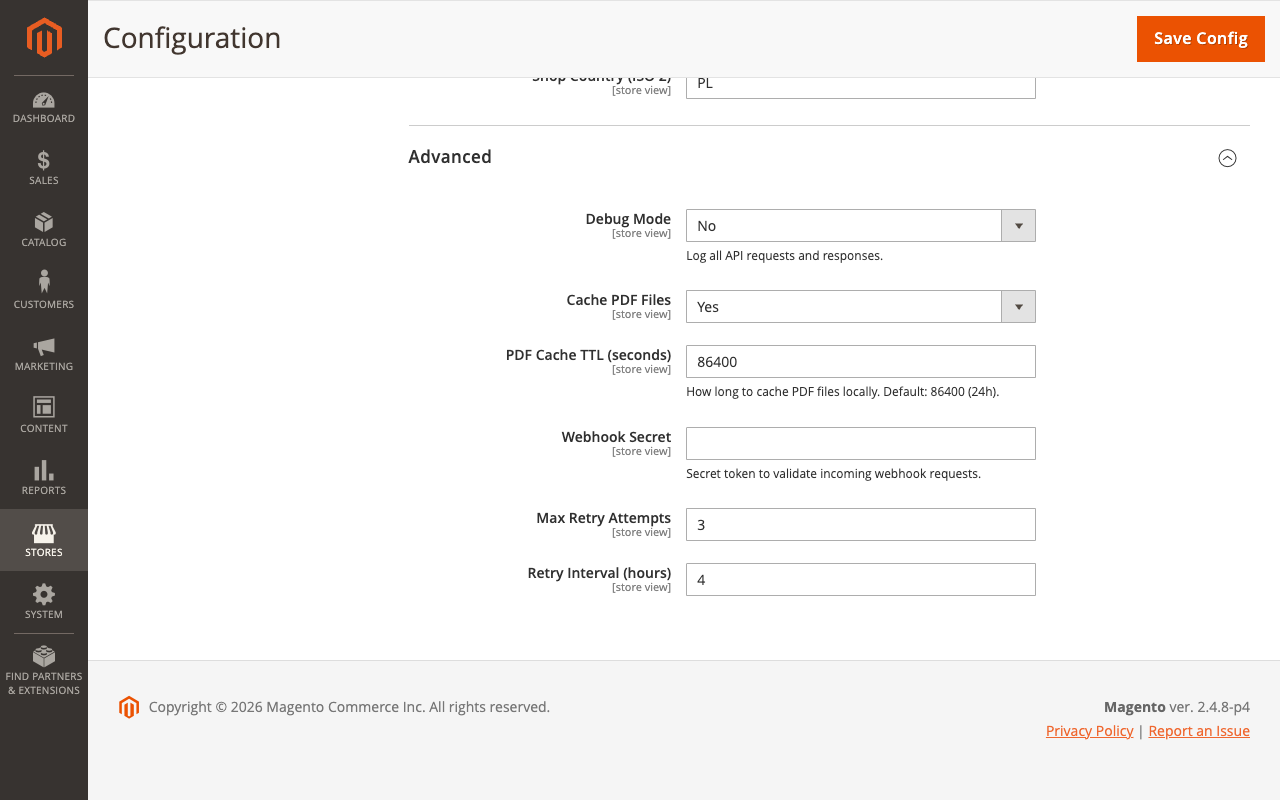
Enable Debug Logging First
Before diagnosing any issue, enable debug logging:
- Go to Stores → Configuration → Plugkit → Fakturownia Pro → Advanced.
- Set Debug Logging to Yes.
- Click Save Config.
- Flush config cache:
bin/magento cache:clean config - Reproduce the issue.
- Review the log:
tail -f /var/www/magento/var/log/fakturownia_pro.logThe log includes the full API request payload, response body, HTTP status code, order ID, rule ID, and queue job ID for every API call and every rule evaluation. Without debug logging, most issues cannot be diagnosed remotely.
Disable debug logging in production once the issue is resolved — the log file grows quickly on high-volume stores.
DI Compilation Errors
"Class Plugkit\FakturowniaProMagento2...\Interceptor does not exist"
Symptoms: 500 error in admin or storefront after installing or upgrading. The error appears in var/log/exception.log.
Root cause: DI compilation was not run after installation, or a previous compilation references old class paths.
Fix:
# Clear generated code completely
rm -rf generated/code/Plugkit
rm -rf generated/metadata/

# Recompile
bin/magento setup:di:compile

# Flush all cache types
bin/magento cache:flush

# If Redis is the cache backend, flush it explicitly
redis-cli -n 1 FLUSHDB  # config/default cache DB
redis-cli -n 2 FLUSHDB  # session DB (if applicable)
Adobe Commerce Cloud: Do not run setup:di:compile locally. Add it to the build phase of .magento.app.yaml:
hooks:
  build: |
    set -e
    php ./vendor/bin/ece-tools run scenario/build/generate.xml
    php ./vendor/bin/ece-tools run scenario/build/transfer.xml
Cloud builds run DI compilation automatically during deploy. Manual runs on cloud environments can conflict with the build cache.
"Circular dependency detected" during DI Compilation
Symptoms: setup:di:compile fails with a circular dependency error mentioning a Plugkit class.
Root cause: A custom module injects a Plugkit service contract that itself injects the custom module's service — circular reference.
Fix: Break the cycle with a proxy injection:
<!-- Your module's di.xml -->
<type name="MyVendor\MyModule\Model\MyService">
    <arguments>
        <argument name="fakturowniaService" xsi:type="object">
            Plugkit\FakturowniaProMagento2\Api\DocumentGenerationServiceInterface\Proxy
        </argument>
    </arguments>
</type>
Proxies are lazy-instantiated and break circular dependency chains without changing behaviour.
"Cannot instantiate interface" Error
Symptoms: Error loading an admin page that references a Plugkit service.
Root cause: The module's di.xml preference declarations were not compiled. Typically means setup:di:compile completed with warnings that were ignored.
Diagnosis:
bin/magento setup:di:compile 2>&1 | grep -i "error\|warning\|plugkit"If warnings reference the Plugkit module, verify all required Composer dependencies are present:
composer show plugkit/fakturownia-pro-magento2
composer validate
Cron Not Running
Symptoms
- Invoices queue but are never generated
- The
plugkit_fakturownia_queuetable accumulatespendingrows that never change tocompleted - No entries in
var/log/fakturownia_pro.logfrom the cron worker (only observer entries)
Diagnosis
# Step 1: Check if Magento cron is configured at all
crontab -l | grep magento

# Step 2: Check the cron schedule table
mysql -u magento -p magento -e "
  SELECT job_code, status, scheduled_at, executed_at, finished_at
  FROM cron_schedule
  WHERE job_code LIKE '%fakturownia%'
  ORDER BY scheduled_at DESC
  LIMIT 10;"

# Step 3: Run the fakturownia cron group manually
bin/magento cron:run --group=fakturownia_pro

# Step 4: Check for errors from the manual run
tail -50 /var/www/magento/var/log/fakturownia_pro.log
Fix: No crontab Entry
Add the standard Magento cron entry:
crontab -e
# Add:
* * * * * php /var/www/magento/bin/magento cron:run 2>&1 | grep -v "Ran jobs by schedule" >> /var/www/magento/var/log/magento.cron.log
Fix: Cron Group Not Being Executed
Some managed hosting environments restrict which cron groups run. Check app/etc/env.php for any cron restrictions:
'cron_groups' => [
    'index' => [
        'schedule_generate_every' => 1,
        'schedule_ahead_for' => 4,
        'schedule_lifetime' => 2,
        'history_cleanup_every' => 10,
        'history_success_lifetime' => 60,
        'history_failure_lifetime' => 600,
        'use_separate_process' => 1,
    ],
],
If fakturownia_pro is not listed and the environment uses use_separate_process: 1 only for listed groups, the fakturownia group runs in the main cron process. This is fine. If a custom restriction blocks unlisted groups, contact your hosting provider.
Fix: Cron Lock Stuck
If the cron process crashed mid-run, a running lock remains in the database:
UPDATE cron_schedule
SET status = 'missed'
WHERE job_code LIKE '%fakturownia%'
  AND status = 'running'
  AND executed_at < DATE_SUB(NOW(), INTERVAL 30 MINUTE);
Fix: Process Queue Manually
If cron cannot be fixed immediately, process the queue manually:
bin/magento fakturownia:queue:processThis is a one-time flush — it does not fix the underlying cron problem.
Redis Cache Issues
Stale Configuration After Saving Settings
Symptoms: Saving settings in Stores → Configuration has no effect. The module uses old API credentials or the wrong template.
Root cause: Redis config cache is serving stale data.
Fix:
# Clean config cache
bin/magento cache:clean config

# If full-page cache is Redis-backed
bin/magento cache:clean full_page

# Nuclear option — flush all Redis databases used by Magento
php -r "
\$redis = new Redis();
\$redis->connect('127.0.0.1', 6379);
\$redis->select(1); \$redis->flushDB(); // config cache
\$redis->select(0); \$redis->flushDB(); // default cache
"
Verify Redis is the Cache Backend
# Check which cache backend is configured
php -r "
\$config = include '/var/www/magento/app/etc/env.php';
print_r(\$config['cache']);
"
If backend is Cm_Cache_Backend_Redis, all bin/magento cache:clean commands flush Redis. If you see a different backend (e.g. Zend_Cache_Backend_File), the file cache is in var/cache/ — delete it directly:
rm -rf /var/www/magento/var/cache/"Connection Refused" to Redis After Server Restart
If Redis restarts with persistence disabled (save "" in redis.conf), the config cache is empty on restart and Magento falls back to database reads — this is expected. If it causes repeated problems after server reboots, configure Redis persistence:
# In /etc/redis/redis.conf
appendonly yes
appendfsync everysec
Flat Table Indexing Conflicts
Symptoms
Invoice generation works but product-level GTU codes are not included on invoices. Or: the fakturownia_gtu_codes product attribute does not appear in the product edit form.
Root cause: Magento flat catalog tables do not include the custom attribute if the flat index was not rebuilt after module installation.
Fix:
# Reindex catalog product flat index
bin/magento indexer:reindex catalog_product_flat

# Check indexer status
bin/magento indexer:status
If the attribute still does not appear, verify it was created by the data patch:
# Check if the attribute exists in the database
mysql -u magento -p magento -e "
  SELECT attribute_code, backend_type, frontend_input
  FROM eav_attribute ea
  JOIN eav_entity_type eet ON ea.entity_type_id = eet.entity_type_id
  WHERE eet.entity_type_code = 'catalog_product'
    AND ea.attribute_code = 'fakturownia_gtu_codes';"
If the attribute is missing, re-run data patches:
bin/magento setup:upgradeGTU Codes Not Appearing on Invoices for Configurable Products
Root cause: The module reads GTU codes from the ordered product (the simple child), not the configurable parent. If GTU is assigned only to the parent, it is not read.
Fix: Assign GTU codes to both the configurable parent and all simple children, or enable GTU code inheritance in Stores → Configuration → Plugkit → Fakturownia Pro → Compliance → GTU Code Inheritance. When enabled, the module checks the simple product first, then falls back to the parent.
API Failures
"SSL Certificate Verify Failed"
Symptoms: API calls fail with an SSL error in the debug log.
Fix: Update the server's CA bundle:
# Debian/Ubuntu
apt-get update && apt-get install --reinstall ca-certificates

# CentOS/RHEL
yum update ca-certificates

# Verify after update
curl -v https://app.fakturownia.pl/api/ 2>&1 | grep "SSL"
Then flush the Magento config cache and retry.
"401 Unauthorized" from Fakturownia API
Symptoms: Debug log shows HTTP 401 response from the Fakturownia API.
Root cause: API token is incorrect, expired, or the account is locked.
Diagnosis:
# Test the API token directly (replace TOKEN and DOMAIN)
curl -s "https://app.fakturownia.pl/invoices.json?api_token=TOKEN/DOMAIN" | python3 -m json.tool | head -20
If the response is {"code": 401} or {"message": "Invalid token"}, the token or domain portion is wrong. Navigate to your Fakturownia account → Account Settings → API → check the exact token format: <api_token>/<subdomain>. The subdomain is the first part of your Fakturownia account URL (e.g. mycompany from mycompany.fakturownia.pl).
Invoices Generated with Incorrect Buyer Data
Symptoms: Invoices show the store's address instead of the customer's, or NIP is missing.
Root cause: Extension attributes were not loaded correctly during observer execution. This happens when a third-party module replaces the order object without loading extension attributes.
Diagnosis:
# Check if NIP extension attribute is present on the order
php bin/magento eval "
\$order = \$objectManager->get('\Magento\Sales\Api\OrderRepositoryInterface')->get(ORDER_ID);
\$ea = \$order->getExtensionAttributes();
var_dump(\$ea ? \$ea->getFakturowniaNip() : 'no extension attributes');
"
If the result is null or no extension attributes, the quote-to-order conversion did not persist the NIP. Check whether a custom checkout module bypasses the standard QuoteManagement::placeOrder() method.
Rate Limit Errors (HTTP 429)
Symptoms: Debug log shows HTTP 429 Too Many Requests from Fakturownia.
Fakturownia API rate limit: 100 requests per minute per account.
Root cause: High-volume store generating many invoices simultaneously (e.g. after a flash sale).
Fix: The module's queue processes one job at a time per cron run. If you are seeing 429 errors, multiple cron processes are running in parallel. Check for duplicate cron entries:
crontab -l | grep magentoIf * * * * * appears twice, remove the duplicate. Each minute should have exactly one cron:run entry. The fakturownia cron group uses use_separate_process: 1 by default — if this is running alongside the default group with many other API calls, adjust the fakturownia cron group schedule to offset from other groups.
Invoice Not Generated for a Specific Order
Diagnostic Checklist
Work through these checks in order:
- Check the queue:
bin/magento fakturownia:queue:status— is there a job for this order? - Check rule conditions: Does the order's payment method, customer group, and total match all conditions?
- Check observer log: With debug logging enabled, re-save the order and check
fakturownia_pro.logforOrderSaveObserver: evaluating order #X. - Check duplicate prevention: Does the order already have a
fakturownia_invoice_idextension attribute from a previous generation attempt? - Check store scope: Is the active rule scoped to a different store view than the order?
- Check rule active status: Navigate to Plugkit → Fakturownia Pro → Invoice Rules and confirm the rule is enabled.
Force Generate for a Specific Order
# Generate invoice for order ID 12345
bin/magento fakturownia:generate --order-id=12345 --type=invoice

# Force regenerate (overwrites existing)
bin/magento fakturownia:generate --order-id=12345 --type=invoice --force
Magento 2.4.7 Specific Issues
PHP 8.3 Compatibility Warning
Magento 2.4.7 added PHP 8.3 support. If you are running PHP 8.3 and see deprecation warnings related to the module, update to the latest patch:
composer update plugkit/fakturownia-pro-magento2 --with-dependencies
bin/magento setup:di:compile
bin/magento cache:flush
Elasticsearch/OpenSearch Index Conflicts
Magento 2.4.4+ requires Elasticsearch or OpenSearch. If reindexing after adding the GTU attribute fails with an ES mapping error, update the product index mapping:
bin/magento indexer:reset catalog_product_attribute
bin/magento indexer:reindex catalog_product_attribute
Getting Support
Collect the following before opening a support ticket:
- Debug log:
var/log/fakturownia_pro.log(last 200 lines) - Exception log:
var/log/exception.log(last 50 lines) - System info:
bin/magento info:all - Module version:
composer show plugkit/fakturownia-pro-magento2 - PHP version:
php --version - Magento version:
bin/magento --version - Failing order ID and the error shown in Plugkit → Fakturownia Pro → Invoice Queue
Open a ticket at plugkit.io with all items attached.