Compliance
Fakturownia Pro for Magento 2 implements the full set of Polish tax compliance requirements: NIP collection at checkout, EU OSS VAT annotation, Split Payment (MPP), GTU codes per product, Reverse Charge for intra-community B2B, and JPK_V7 metadata. All features are implemented via Magento's native architecture — custom attributes, extension attributes, observer hooks, and plugin interceptors — not rewrites.
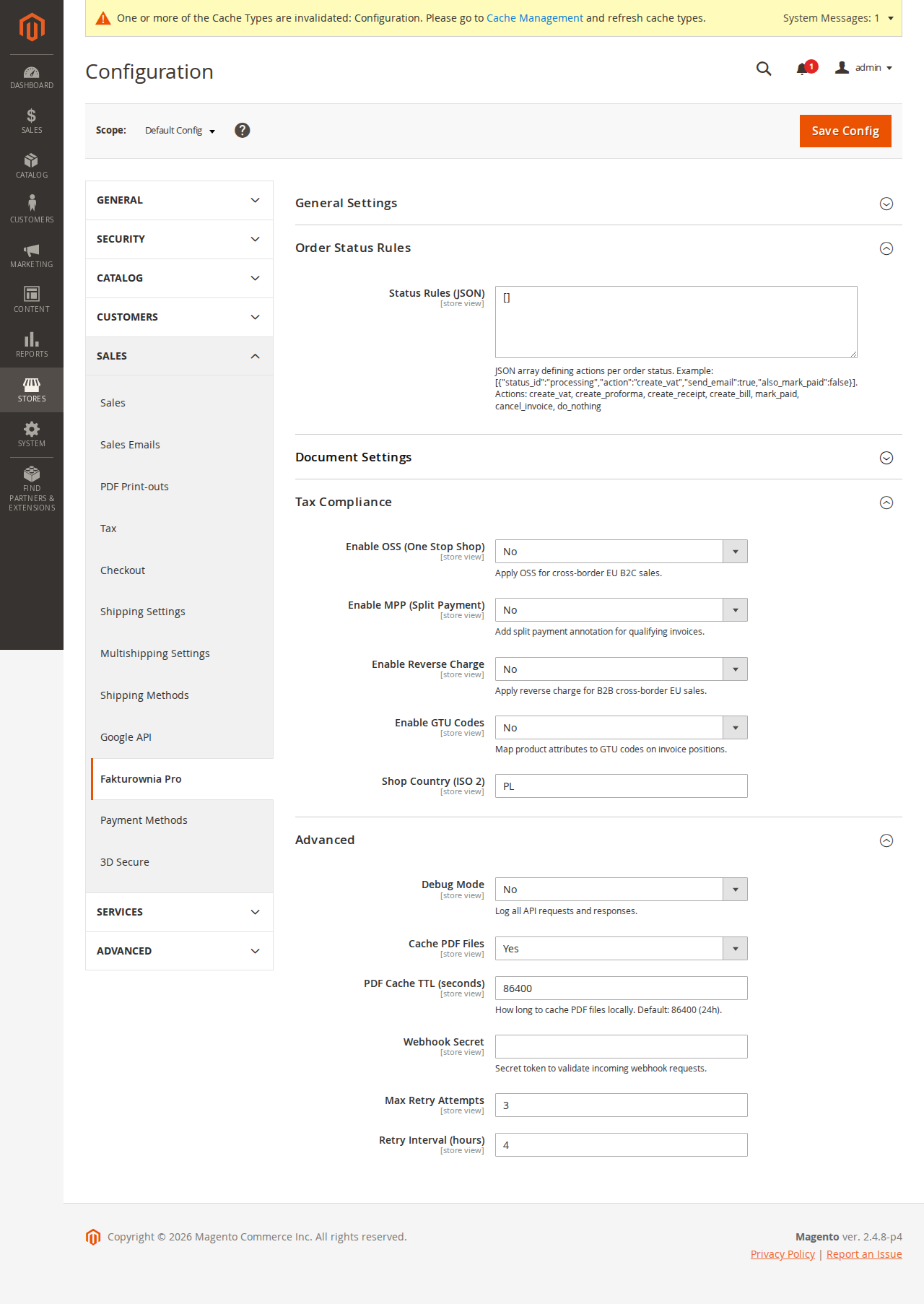
All compliance settings are at Stores → Configuration → Plugkit → Fakturownia Pro → Compliance.
NIP Field at Checkout
What It Does
Adds a NIP (Tax Identification Number) field to the Magento 2 checkout billing address form. This allows B2B customers to enter their Polish or EU company VAT number. The NIP value is:
- Rendered as a standard checkout field via the UI component system (
checkout_index_index.xmllayout + JSLayout merge) - Validated client-side with a JS mixin using Magento's
mage/validationlibrary - Validated server-side via a
QuotePluginafterPlugin on\Magento\Quote\Api\CartManagementInterface - Stored as a quote extension attribute (
fakturownia_nip) and transferred to the order on placement - Saved as a custom
customer_addressattribute for returning customers - Automatically included on generated invoices as the buyer's
tax_nofield
NIP Checksum Validation
The NIP is validated by a weighted checksum algorithm before the quote is saved. Each digit is multiplied by a positional weight, the total is divided by 11, and the remainder must equal the check digit (position 10). If validation fails, the checkout form shows an inline error and the order cannot be placed.
The NIP format accepted: 10 digits, optionally prefixed with PL. Dashes and spaces are stripped before validation.
Example — NIP 1234563218:
Weights: 6, 5, 7, 2, 3, 4, 5, 6, 7
Digits:  1, 2, 3, 4, 5, 6, 3, 2, 1
Sum: 6*1 + 5*2 + 7*3 + 2*4 + 3*5 + 4*6 + 5*3 + 6*2 + 7*1 = 6+10+21+8+15+24+15+12+7 = 118
Remainder: 118 mod 11 = 8
Check digit (position 10): 8 ✓
Configuration
| Option | Description | Default |
|---|---|---|
| Enable NIP field | Show NIP field at checkout | Off |
| Required for companies | Mandatory when Company field is filled | Off |
| VIES validation | Cross-check EU VAT numbers via VIES API | Off |
| Save to customer address | Persist NIP for returning customers | On |
| Field label | Checkout field label | NIP / Tax ID |
| Field position | before_company or after_phone | after_company |
VIES Validation
When VIES validation is enabled, the server-side plugin calls the EU VIES SOAP service to validate the VAT number. VIES is an EU Commission service and has occasional downtime. If VIES is unreachable:
- The module logs a warning to
var/log/fakturownia_pro.log - The order is allowed to proceed (fail-open by default)
- The invoice is generated without the
vies_validated: trueflag
To switch to fail-closed (block checkout when VIES is unreachable), set vies_fallback_allow: false in app/etc/env.php:
'plugkit_fakturownia' => [
    'vies_fallback_allow' => false
]
Custom Attribute Persistence
The NIP is stored as a customer_address entity attribute declared in Setup/Patch/Data/AddNipCustomerAttribute.php as a declarative data patch. This ensures:
- NIP is available in the REST API:
GET /V1/customers/:idincludes the address attribute - NIP is visible in the Magento admin on the customer address page
- Third-party OMS integrations that use the REST API can read and write NIP values
EU One Stop Shop (OSS)
Overview
For stores registered under the EU OSS scheme, invoices must reflect the buyer's country VAT rate and include an OSS annotation. Fakturownia Pro reads the destination tax rates calculated by Magento and annotates the invoice accordingly.
How OSS Detection Works
The module hooks into Magento's tax pipeline via an observer on tax_quote_address_collect_totals_after. After the standard tax totals are collected:
- The observer checks whether OSS mode is enabled and whether the order is B2C (no valid EU VAT number).
- If both conditions are met, it reads the applied
AppliedTaxobjects from the quote address. - Each applied tax is mapped to a country code via the tax rule configuration.
- The resulting per-country tax breakdown is passed to the Fakturownia API payload via the
taxesarray.
The module does not replace Magento's tax calculation. You still need a compatible tax extension (e.g. Amasty EU VAT, Taxify, or the built-in Magento VAT ID validation with manually configured destination tax rules) to calculate the correct destination country rates. Fakturownia Pro only reads the output.
Configuration
| Option | Description | |---|---| | Enable OSS | Activate OSS invoice annotation | | Store country | Physical store location, used to determine domestic vs OSS supply (default: Poland) | | Apply to B2C only | Exclude validated EU VAT customers — intra-community supply rules apply instead | | Fallback VAT rate | Used when no destination country rate is found (default: Polish VAT rate) |
OSS and Reverse Charge Interaction
A customer with a valid EU VAT number is subject to Reverse Charge (intra-community supply), not OSS. The two features are mutually exclusive:
- Valid EU VAT + VIES validated → Reverse Charge (0% VAT, RC annotation)
- No EU VAT or VIES not validated → OSS (buyer's country rate, OSS annotation)
- Domestic Polish customer → Standard Polish VAT
If both OSS and Reverse Charge are enabled, the Reverse Charge check runs first and takes precedence.
Split Payment (Mechanizm Podzielonej Płatności — MPP)
Legal Requirement
Polish law mandates that VAT invoices above PLN 15,000 gross for goods/services listed in Annex 15 of the Polish VAT Act include the annotation mechanizm podzielonej płatności and the split_payment: true flag in the document. This allows — and in many cases requires — the buyer to use split payment when settling the invoice.
Software licences are not in Annex 15. However, some B2B buyers request the MPP annotation anyway for their internal accounting systems. The Apply to all invoices option supports this.
Magento Implementation
The SplitPaymentPlugin is an afterPlugin on DocumentGenerationService::buildPayload():
// Plugin/SplitPaymentPlugin.php
public function afterBuildPayload(
    DocumentGenerationService $subject,
    array $payload,
    OrderInterface $order
): array {
    $totalPln = $this->currencyConverter->convert(
        $order->getGrandTotal(),
        $order->getOrderCurrencyCode(),
        'PLN'
    );
    if ($totalPln >= $this->config->getMppThreshold()) {
        $payload['split_payment'] = true;
        $payload['description'] = ($payload['description'] ?? '') . "\nmechanizm podzielonej płatności";
    }
    return $payload;
}
Currency conversion uses \Magento\Directory\Model\Currency against the stored exchange rates in the directory_currency_rate table. Keep exchange rates current (Stores → Currency → Import) to ensure accurate PLN conversion for foreign-currency orders. Stale rates cause the threshold check to fail silently.
Configuration
| Option | Default | Description | |---|---|---| | Enable MPP | Off | Activate automatic Split Payment detection | | Threshold (PLN) | 15000 | Gross order amount threshold | | Apply to all invoices | Off | Force MPP annotation on every invoice regardless of amount |
GTU Codes
What GTU Codes Are
GTU (Grupy Towarów i Usług) codes are mandatory Polish JPK_V7 transaction classifiers. They identify categories of goods and services that require special VAT reporting. Selling software licences requires GTU_12.
Full GTU Reference
| Code | Category | Software Licence Applies? | |---|---|---| | GTU_01 | Alcoholic beverages | No | | GTU_02 | Tobacco products, cigarettes | No | | GTU_03 | Heating oil, engine fuel | No | | GTU_04 | Electronics in customs tariff 85 (hardware) | Possibly (physical hardware) | | GTU_05 | Greenhouse gas waste | No | | GTU_06 | Electronic devices with reverse charge | No | | GTU_07 | Vehicles and parts | No | | GTU_08 | Precious metals, alloys | No | | GTU_09 | Medicines, medical devices | No | | GTU_10 | Buildings, structures (real estate) | No | | GTU_11 | Natural gas, electricity, heat | No | | GTU_12 | Computer equipment, electronic devices, software licences, IT services | Yes | | GTU_13 | Transport and warehouse services | No |
For software-only stores, assign GTU_12 to all products. For mixed stores (hardware + software), assign GTU_12 to software products and GTU_04 to physical hardware.
Confirm the correct code with your accountant — applying the wrong GTU code is a JPK reporting error.
Assigning GTU Codes to Products
GTU codes are stored as a custom multi-select product attribute fakturownia_gtu_codes, declared in Setup/Patch/Data/AddGtuProductAttribute.php.
To assign:
- Navigate to Catalog → Products → Edit.
- In the Fakturownia Pro attribute group, select the applicable GTU code(s).
- Save the product.
For configurable products: assign GTU codes to the parent configurable product. The module reads GTU codes from the parent when processing order line items that reference simple child products. If the parent has no GTU code set, the module falls back to the simple product's GTU code.
Bulk GTU Assignment via CLI
For stores with many products, assign GTU codes in bulk using the Magento ORM:
php bin/magento eval "
\$collection = \$objectManager->get('\Magento\Catalog\Model\ResourceModel\Product\Collection');
\$collection->addAttributeToFilter('type_id', 'simple');
foreach (\$collection as \$product) {
    \$product->setFakturowniaGtuCodes(['GTU_12']);
    \$product->save();
}
echo count(\$collection) . ' products updated';
"
For production use, implement this as a data patch in your custom module rather than a one-off CLI command.
GTU in API Payload
When an invoice is generated, the module iterates over order line items, reads fakturownia_gtu_codes from each product, and includes them per line:
{
  "positions": [
    {
      "name": "Software Licence — Enterprise Plan",
      "quantity": 1,
      "total_price_gross": 1230.00,
      "tax": 23,
      "gtu_codes": ["GTU_12"]
    }
  ]
}
Shipping lines, gift wrapping, and discount adjustments do not get GTU codes unless you assign them to the virtual products representing those items.
Reverse Charge
When It Applies
Reverse Charge applies to intra-community B2B supplies: the buyer is a VAT-registered business in another EU member state. For Magento stores selling software licences to EU businesses, this is common.
When Reverse Charge applies:
- VAT rate on the invoice: 0%
- Invoice annotation:
Odwrotne obciążenie / Reverse charge - Buyer's VAT number included on the invoice
- No Polish VAT reported on this transaction (the buyer self-accounts)
Magento Implementation
The module integrates with Magento's native VAT validation system (\Magento\Customer\Model\Vat). The flow:
- Customer enters an EU VAT number at checkout.
- Magento's
VatValidatorfires (if enabled) and verifies the number against VIES. - Magento's automatic customer group assignment moves the customer to a tax-exempt group (e.g.
B2B_EU_VAT). - The
TaxClassObserverin the module detects the tax-exempt group. - During invoice generation, the
ReverseChargePluginsetsvat_rate: 0and adds the RC annotation.
Dependency on Magento VAT Validation
Enable Magento's built-in VAT validation at:
Stores → Configuration → Customers → Customer Configuration → Create New Account Options → Enable Automatic Assignment to Customer Group → Yes
Configure tax rules so that the B2B EU group has 0% VAT applied. Without this, Magento will still charge standard VAT even when the customer provides a valid EU VAT number.
Configuration
| Option | Description |
|---|---|
| Enable Reverse Charge | Activate RC logic |
| Applicable customer groups | Groups that qualify for RC (typically your B2B EU group) |
| RC note text | Default: Odwrotne obciążenie / Reverse charge |
| Require VIES validation | Only apply RC to orders where VIES returned valid=true |
RC and VIES Downtime
If VIES is unavailable during checkout and Require VIES validation is enabled, the customer is not assigned to the B2B EU group, and the RC annotation is not applied — the invoice is generated with standard Polish VAT. This protects you from incorrectly issuing 0% VAT invoices to unverified buyers.
JPK_V7 Compatibility
All documents generated by the module include the metadata required for JPK_V7:
| JPK_V7 Field | Source |
|---|---|
| GTU codes per line | fakturownia_gtu_codes product attribute |
| MPP flag | split_payment from SplitPaymentPlugin |
| RC flag | vat_rate: 0 + RC annotation from ReverseChargePlugin |
| Document type marker | FV (Faktura VAT), RO (receipt/paragon) |
| OSS country VAT | taxes array from OSS observer |
Fakturownia generates compliant JPK_V7 XML export files from these documents. The export is done directly from the Fakturownia portal — no additional Magento module is required.
Custom Attribute Architecture
All compliance data flows through Magento's extension attribute system:
| Extension Attribute | Entity | Type | Purpose |
|---|---|---|---|
| fakturownia_nip | Order, OrderAddress, Quote | string | Buyer NIP / VAT number |
| fakturownia_invoice_id | Order | int | Fakturownia document ID |
| fakturownia_invoice_number | Order | string | Human-readable invoice number |
| fakturownia_invoice_status | Order | string | pending, completed, failed |
| fakturownia_gtu_codes | Product (EAV attribute) | multiselect | GTU codes for this product |
All extension attributes are declared in extension_attributes.xml and implemented via ExtensionAttributeInterface, ensuring compatibility with the Magento REST API, GraphQL API, and third-party OMS integrations. Any system that reads orders via GET /V1/orders/:id receives the compliance data in the extension_attributes block.
Compliance Checklist
Before going live, verify:
- [ ] NIP field enabled and visible at checkout (test with a Polish NIP:
5862296909) - [ ] NIP is present on generated invoices as
tax_no - [ ] GTU_12 assigned to all software product SKUs
- [ ] GTU codes appear on invoice line items (check Fakturownia document view)
- [ ] MPP enabled if you sell to Polish businesses with order totals above PLN 15,000
- [ ] OSS enabled and store country set to Poland (if OSS registered)
- [ ] Reverse Charge enabled, Magento VAT validation enabled, B2B EU customer group configured with 0% tax rule
- [ ] Exchange rates imported and current (Stores → Currency → Import)
- [ ] Test a B2B EU order: expect 0% VAT and RC annotation on invoice
- [ ] Test a domestic B2C order: expect standard 23% VAT, no RC annotation