ROI Tracking
ReturnShield tracks whether applied fixes actually reduce return rates — and tells you when they do not. Every applied Action Queue fix enters a 60-day outcome measurement window. After the window closes, the actual return rate change is compared to the AI's prediction. The aggregate of all measured improvements drives the "Saved Since Install" counter on the dashboard.
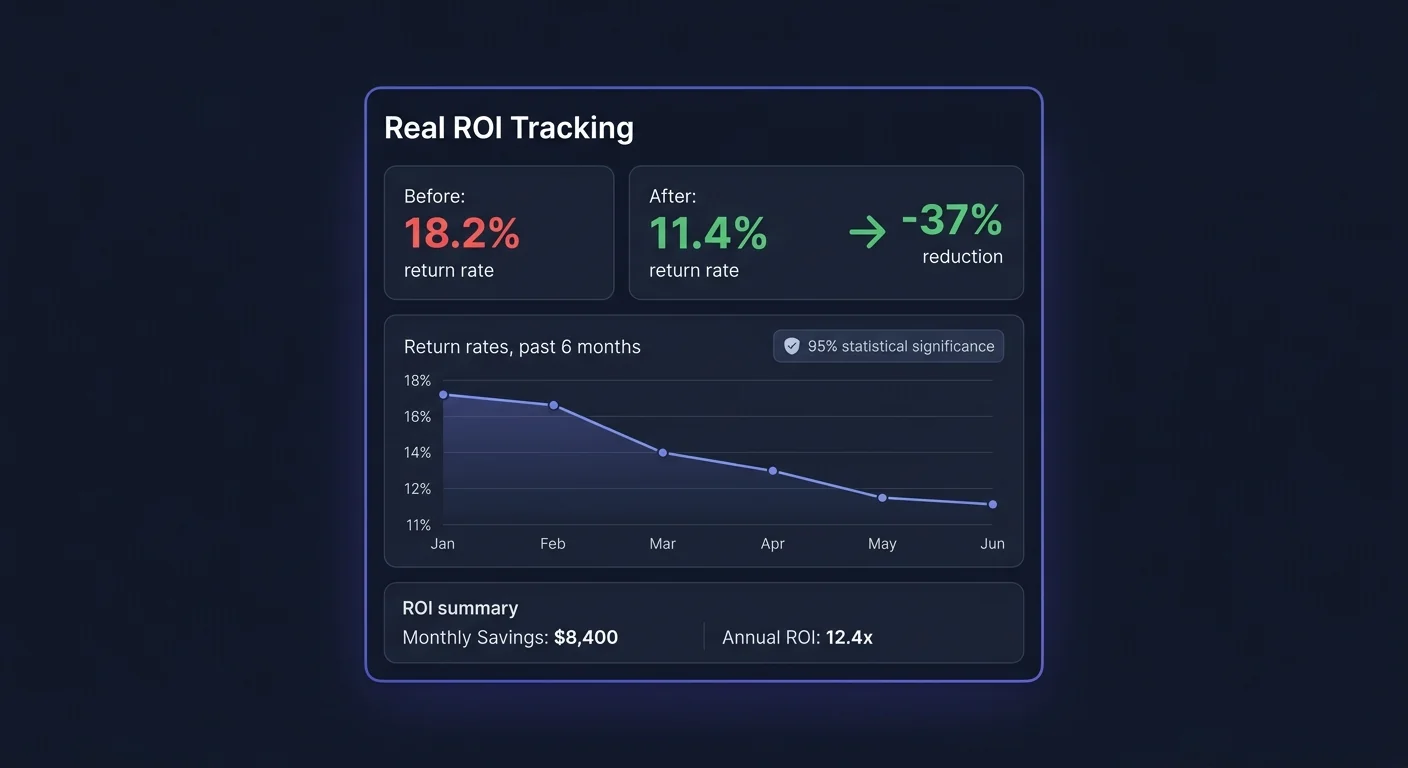
Before/After Return Rate Methodology
The Measurement Window
When you apply a fix, ReturnShield records:
- Apply date: The exact timestamp when the Shopify product description was updated
- Pre-fix baseline: The product's return rate over the 60 days immediately before the apply date
- Post-fix measurement: The product's return rate over the 60 days after the apply date
- Fix status: Outcome is classified as Improved, Unchanged, or Regressed after the window closes
Why 60 Days
Sixty days is long enough to account for:
- Customers who purchased after seeing the updated listing (they are the only ones who could benefit from the change)
- Typical order-to-return timelines (most returns happen within 30 days; 60 days captures the tail)
- Seasonal volatility smoothing (a 60-day window across one seasonal period has less noise than 14 or 30 days)
Shorter windows would produce misleading results. A fix applied in early December and measured over 30 days would capture the post-holiday return spike regardless of listing quality — the fix would appear to have failed when the real cause was seasonal.
Measurement Period Overlap
If you apply multiple fixes to the same product within 60 days, ReturnShield attributes the improvement to each fix proportionally based on the AI's confidence score at the time of application. This is an approximation — separating the individual impact of simultaneous changes to the same product is statistically intractable. For the most accurate outcome data, allow at least 60 days between fixes to the same product before applying a second change.
Statistical Significance
Why 30+ Orders Matter
ReturnShield flags outcome results as statistically significant only after the product has received at least 30 new orders in the post-fix window. This is the minimum sample size needed to detect a meaningful change in return rate with reasonable confidence.
What this means in practice:
| Monthly order volume for product | Time to reach 30 post-fix orders | Reliability of outcome | |---|---|---| | 100+ orders/month | Under 30 days | High | | 30–100 orders/month | 1–2 months | Moderate | | 10–30 orders/month | 2–4 months | Low — use as indicator, not proof | | Under 10 orders/month | 3+ months | Unreliable — do not make decisions on this data |
For low-volume products, ReturnShield shows the outcome with a "Low statistical confidence" warning rather than suppressing it entirely. A directional improvement (even if not statistically robust) is still useful information.
Confidence Intervals
Outcome results include a confidence interval alongside the point estimate:
Pre-fix return rate:   23%
Post-fix return rate:  15% ± 4pp (90% confidence interval: 11%–19%)
Improvement:           -8pp
Significance:          p < 0.05 (statistically significant at 5% threshold)
A confidence interval that spans zero (e.g., -4pp ± 6pp) means the change could plausibly be random variation rather than a genuine improvement. ReturnShield labels these outcomes as "Uncertain" rather than "Improved."
The "Saved Since Install" Counter
The dashboard's savings counter shows cumulative estimated cost savings from all applied fixes since the app was installed.
Calculation Method
For each applied fix with a closed (60-day) outcome window:
Improvement = pre_fix_rate - post_fix_rate  (in percentage points)
Monthly_returns_prevented = (improvement / 100) × monthly_units_sold
Monthly_savings = monthly_returns_prevented × true_cost_per_return
Cumulative_savings = Σ (monthly_savings × months_since_fix_applied)
The counter accumulates month over month — a fix applied 6 months ago that reduced return rate by 5 percentage points contributes 6 months of savings to the total, not just 1.
Why the Counter Grows Over Time
Even if you stop applying new fixes, the counter continues growing because existing fixes continue preventing returns. A fix applied today that saves $200/month will contribute $2,400 to the counter after 12 months. This compounding is why the counter often surprises merchants who have been using the app for more than 3 months — the early fixes continue accumulating value.
"What Didn't Work" Transparency
Below the savings counter, ReturnShield shows a separate panel for fixes that did not produce a measurable improvement:
| Column | Description | |---|---| | Product | Product name | | Fix applied | Summary of what was changed | | Pre-fix rate | Return rate before the fix | | Post-fix rate | Return rate after the 60-day window | | Outcome | Unchanged or Regressed | | AI assessment | Why the fix may not have worked |
This section is intentionally visible. Accurate ROI measurement requires counting both the wins and the misses. The savings counter only includes confirmed improvements — it does not inflate by including uncertain or failed outcomes.
Common reasons a fix does not improve the return rate:
- The complaint in return notes was about product quality (an out-of-stock batch issue), not the listing description
- A new batch of returns arrived with a different complaint than the one the fix addressed
- Low order volume (fewer than 30 orders in the measurement window) — inconclusive, not a genuine failure
- The fix was in the right direction but the wording change was too minor to change customer expectations
Monthly ROI Email Reports
ReturnShield sends a monthly email report to the store admin (and any additional recipients you configure) summarizing:
Report Contents
Return Rate Summary
- Current month return rate vs. prior month
- Current month vs. same month last year
- Industry benchmark comparison
Fixes Applied This Month
- Number of fixes applied
- Products updated
- Aggregate expected monthly savings from this month's fixes
Fixes with Closed Measurement Windows
- Fixed that completed their 60-day window this month
- Actual savings attributed to each (or "insufficient data" for low-volume products)
Savings Ledger
- Month-over-month savings counter growth
- Cumulative savings since install
- Estimated annual run rate at current trajectory
Action Queue Status
- Number of pending fixes awaiting review
- Top 3 products by expected savings (prompt to review)
Configuring the Report
Go to Settings → Reports → Monthly ROI Report:
| Setting | Default | Options | |---|---|---| | Enabled | On | On / Off | | Recipients | Admin email | Add additional email addresses | | Send day | 1st of month | 1st–5th of month | | Include "What Didn't Work" | On | On / Off | | Currency | Store default | Override for reporting currency |
Using ROI Data to Justify the Subscription
For Internal Reporting
The ROI data is designed to be presentable to business stakeholders without interpretation. Key figures to use:
Payback period: monthly_subscription_cost / monthly_savings_rate. If the app is saving $800/month and costs $79/month, the payback period is under 3 days.
Annual projected savings: monthly_savings_rate × 12. This is the figure that makes the strongest case in budget reviews.
Return rate improvement: The percentage point reduction in your store's overall return rate since install. Even a 2pp improvement on a store processing $1M/year in returns saves tens of thousands of dollars annually.
Export for Reports
Click "Export ROI Report" on the ROI Tracking page:
| Export | Contents | |---|---| | Summary CSV | Aggregate figures: savings to date, return rate before/after, fixes applied | | Fix-level CSV | Every applied fix with pre/post rates, improvement, and savings attribution | | Monthly breakdown CSV | Month-by-month savings accumulation since install |
The fix-level CSV is useful for presenting specific evidence ("Fix to Product X description reduced that product's return rate from 22% to 14%") rather than just aggregate totals.
Interpreting Flat or Negative Periods
If the monthly savings figure is flat for 2–3 months, it typically means:
- No new fixes were applied in that period (the counter grows from existing fixes only)
- Several fixes entered their 60-day window and showed "Unchanged" outcomes
- Seasonal return spikes temporarily offset fix-driven improvements
A flat period is normal and does not indicate the app stopped working. Check whether fixes are being applied — the Action Queue may have accumulated unapproved items. Set up auto-apply for high-confidence fixes to maintain continuous improvement without manual review.
Connecting ROI to Pricing Decisions
Stores with clear ROI data from ReturnShield sometimes use it to inform pricing decisions:
- Lower free return threshold: If data shows your return rate is supply-side (listing issues), not demand-side (price sensitivity), you have evidence to reduce the free return window without churn risk
- Price corrections on high-return products: Products with high return rates despite accurate listings may be priced in a range where customer expectations exceed what the product delivers — a pricing signal
- Identify products worth dropping: Persistent high-risk scores with no fixable issue (product quality returns, not listing returns) and high true cost per return — the product may not be worth stocking
ROI data alone does not make these decisions, but it provides the quantified return cost foundation that makes the analysis concrete rather than intuitive.
Next Steps
- Dashboard — the savings counter in context with the trend chart
- AI Action Queue — applying fixes to generate the improvements the ROI counter measures
- Fraud Detection — preventing the return costs that listings fixes cannot address