Fraud Detection & Prevention
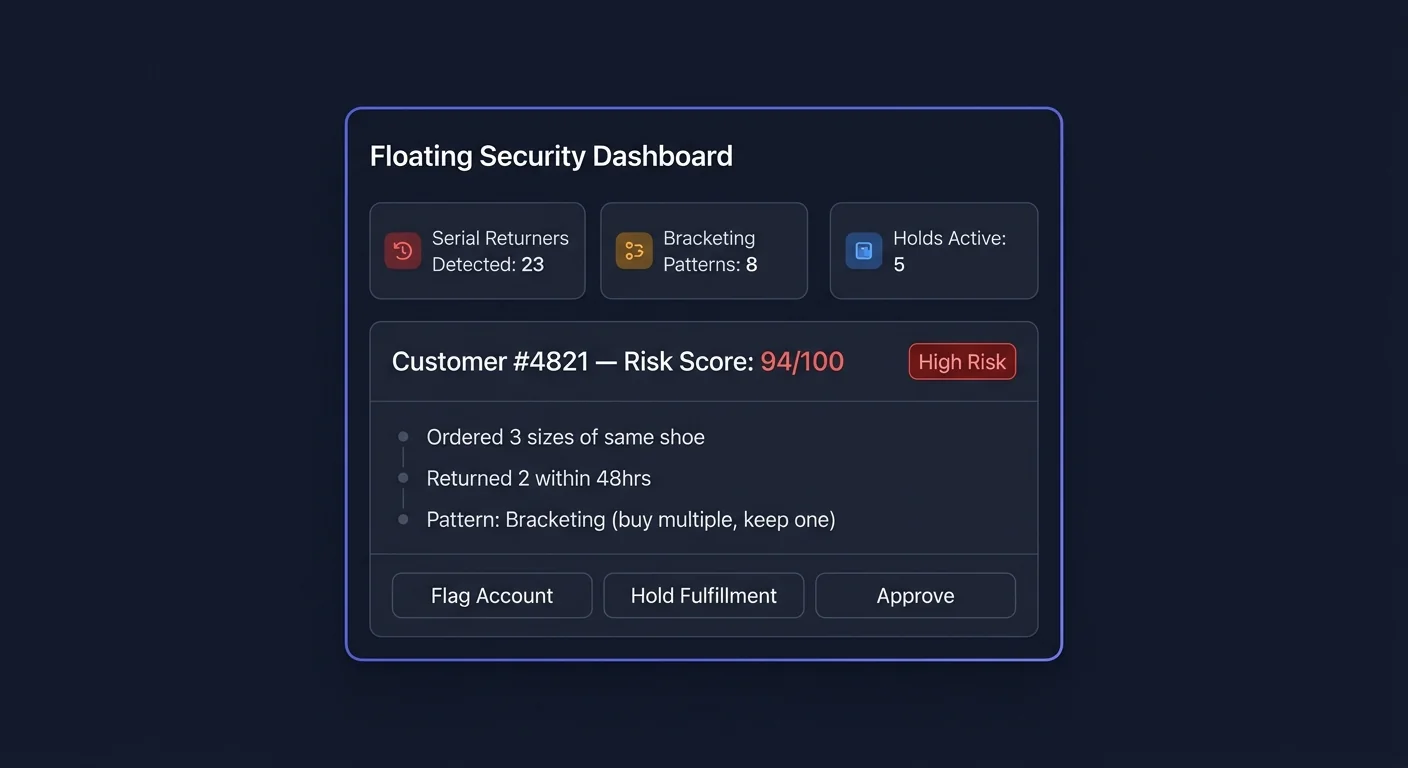
Not all returns are created equal. ReturnShield identifies customers who exploit return policies — serial returners, wardrobers, and bracketing buyers — and surfaces them before fulfillment so you can act before a loss occurs. Unlike listing-quality fixes (which address genuine misunderstandings), fraud detection targets deliberate misuse of your return policy.
What Counts as Return Fraud
Return fraud is any pattern where the return policy is used in a way that was not intended and that costs your store money without providing genuine customer value:
| Pattern | Description | Common in | |---|---|---| | Serial returning | Customer returns the majority of every order, across many orders | Fashion, electronics | | Wardrobing | Buying, using, and returning an item in like-new condition | Special occasion wear, event electronics | | Bracketing | Buying multiple sizes/colors of the same item intending to keep one and return the rest | Apparel, footwear | | False claims | Claiming item was defective, wrong size, or never arrived when it was correct and delivered | All categories | | Refund farming | Systematically exploiting return windows or free return shipping | High-shipping-cost items |
ReturnShield's fraud detection focuses on the signals that are detectable from order and return data: serial returning, bracketing, and customer-level patterns. It does not have access to physical item condition, so wardrobing detection is indirect (using return reason analysis and timing patterns).
Serial Returner Scoring
What Triggers Serial Returner Status
A customer receives a serial returner score based on their behavior over their full order history with your store:
| Signal | Weight | Description | |---|---|---| | Lifetime return rate | Very high | What percentage of all orders placed by this customer had at least one returned item? | | Orders placed vs. items kept | High | How many items total has the customer kept vs. returned? | | Return frequency acceleration | High | Is the customer returning more frequently over time? | | Return within days of delivery | Medium | Consistent pattern of returning 1–3 days after delivery suggests use-and-return | | Multi-item returns on single orders | Medium | Returning 3+ items from a single order is a signal | | No-reason returns | Medium | Customer never provides a reason, or always uses "changed my mind" | | Cross-product returning | Low | Returns across all product types (not concentrated in one category) | | Account age vs. return volume | Low | New account with immediate high-value returns |
Score Thresholds
| Score range | Customer label | Default threshold action | |---|---|---| | 0–29 | Standard | No action | | 30–59 | Elevated risk | Flag for review | | 60–79 | High risk | Alert on new order | | 80–100 | Serial returner | Hold fulfillment (if configured) |
Thresholds are configurable per store — see Configuring Thresholds below.
Bracketing Detection
How Bracketing Is Identified
Bracketing is detected at the order level when:
- A single order contains 2+ variants of the same base product (e.g., same SKU in sizes S, M, L — or same style in three colors)
- The customer has a history of placing similar multi-variant orders and then returning all but one variant
The detection requires at least 2 historical orders to establish a pattern — a single multi-variant order does not trigger bracketing detection by itself.
Bracketing Score Signals
| Signal | Description | |---|---| | Multi-variant order frequency | How often does this customer place orders with 2+ variants of the same product? | | Multi-variant return rate | What percentage of multi-variant orders result in returns of all but one variant? | | Time between order and return on multi-variant orders | Fast returns (under 5 days) on multi-variant orders are a strong signal | | Variant combinations | Do the variant combinations follow a consistent pattern (S+M+L, XS+S+M)? |
A confirmed bracketer has: ≥3 multi-variant historical orders, ≥80% multi-variant return rate, and consistent fast return timing.
What You See for a Bracketing Order
When a new order triggers the bracketing pattern, the order in Shopify receives a ReturnShield tag rs-bracketing-alert. In the ReturnShield admin panel, the order appears with:
- Bracketing likelihood: Percentage estimate based on the pattern strength
- Expected return scenario: "Customer likely to keep size M and return S and L"
- Historical pattern summary: "4 of 5 prior multi-variant orders resulted in 2+ item returns"
Customer Risk Profiles
Viewing a Customer's Risk Profile
Every customer with a risk score above 30 has a detailed risk profile accessible from:
- ReturnShield → Fraud Detection → Customer Risk Profiles — searchable by name, email, or Shopify customer ID
- Shopify Admin → Customers → [Customer] — ReturnShield adds a risk badge to the customer's Shopify profile page (via the Shopify Customer Profile app extension)
- The order panel — any order from a flagged customer shows the risk badge
What the Risk Profile Contains
| Section | Contents | |---|---| | Risk score & tier | Current score and label (Standard / Elevated / High / Serial Returner) | | Score drivers | The top 3–5 signals contributing to the elevated score, ranked by weight | | Order history summary | Total orders, total returns, lifetime return rate, total refunded | | Return pattern chart | Return rate over time — shows whether behavior is improving or worsening | | Recent returns | Last 10 returns with product, reason, and return timing | | Bracketing history | Multi-variant orders and their return outcomes | | Notes | Manual notes field — add context known outside the data (e.g., "wholesale customer — ignore multi-variant orders") | | Actions | Whitelist, apply manual threshold, flag for review |
Whitelisting a Customer
If a customer has a high risk score for a legitimate reason (e.g., they are a stylist who orders multiple items for clients and returns the unchosen ones), you can whitelist them:
- Open their risk profile
- Click "Whitelist this customer"
- Add a note explaining the reason
- Confirm
Whitelisted customers are excluded from all automated fraud alerts and fulfillment holds. Their score continues to be calculated, but no actions trigger on new orders. You can remove whitelist status at any time.
Automated Fulfillment Holds
How Holds Work
When a new order is placed by a customer whose risk score exceeds the configured hold threshold, ReturnShield adds a fulfillment hold tag to the order in Shopify. The order is flagged for manual review before being fulfilled.
The tag added is rs-hold-fraud-risk. You can configure your fulfillment workflow or Shopify Flow to treat this tag as a pause signal.
What the Hold Does and Does Not Do
What it does:
- Adds the
rs-hold-fraud-risktag to the Shopify order - Creates a review task in the ReturnShield Fraud Detection queue
- Sends an alert email to the configured notification recipients
What it does not do:
- It does not automatically cancel or refund the order
- It does not charge the customer differently
- It does not communicate anything to the customer
All hold decisions are surfaced for human review. ReturnShield never automatically cancels or refuses orders — that decision belongs to you.
Reviewing Held Orders
Navigate to ReturnShield → Fraud Detection → Held Orders to see all orders currently on hold.
For each held order:
| Column | Description | |---|---| | Order | Shopify order link | | Customer risk score | Current score and tier | | Hold reason | Primary trigger (serial returner, bracketing, new account high-value) | | Order value | Gross order total | | Time in hold | How long since the hold was applied | | Actions | Release hold, cancel order, whitelist customer |
Release and fulfill: Click "Release hold" to remove the rs-hold-fraud-risk tag. Shopify's fulfillment workflow can then proceed normally.
Cancel: If you decide not to fulfill after reviewing, cancel from Shopify directly — ReturnShield does not have order cancellation capability.
Hold Notification Emails
When a hold is applied, a notification is sent to configured recipients with:
- Order number and order value
- Customer name, email, and risk score
- The risk signals that triggered the hold
- A direct link to the hold review queue
High-Risk Order Alerts
Alerts fire for orders that meet risk criteria but fall below the hold threshold. Unlike holds, alerts are informational — they do not add a Shopify tag or affect fulfillment. They notify you that an order warrants attention.
Alerts appear in:
- ReturnShield → Fraud Detection → Alerts — a timestamped log
- Email notifications (if configured under Settings → Notifications)
- Shopify order notes — a note is added to the order: "ReturnShield: High-risk customer — review before fulfilling"
Alert Triggers
| Trigger | Default threshold | |---|---| | Customer risk score | 60–79 (below hold threshold of 80) | | New account + high order value | Account < 30 days old AND order > configured value | | Sudden order value spike | Order 3× the customer's average order value | | Bracketing likelihood | 70%+ likelihood score on a multi-variant order | | Velocity: multiple orders in 48h | 3+ orders from same customer in 48 hours |
Configuring Thresholds Per Store
Navigate to Settings → Fraud Detection to configure all thresholds.
Risk Score Thresholds
| Setting | Default | Notes | |---|---|---| | Alert threshold | 60 | Score above which an informational alert fires | | Hold threshold | 80 | Score above which a fulfillment hold is applied | | Serial returner label | 80 | Score above which a customer is labeled "Serial Returner" in their profile |
Raising the hold threshold (e.g., to 90): Fewer orders are held, fewer false positives, more fraud slips through. Appropriate for stores where customer service costs of investigating holds are high relative to the fraud volume.
Lowering the hold threshold (e.g., to 70): More orders are held, more legitimate orders are flagged for review, more fraud is caught before fulfillment. Appropriate for high-ticket-item stores where the cost of a single fraudulent return is significant.
Order Value Minimums
Set a minimum order value below which fraud checks do not trigger holds (only alerts):
| Setting | Default | Notes | |---|---|---| | Minimum order value for hold | $50 | Orders below this value trigger alerts but not holds | | Minimum order value for alert | $25 | Orders below this value are not flagged at all |
Low-value orders do not warrant the customer service overhead of reviewing a hold. Most stores find that setting the hold threshold at 2–3× the average cost-to-fulfill makes the operational cost of holds proportionate to the fraud risk avoided.
Category Exclusions
Some product categories legitimately attract multi-variant purchases that look like bracketing. Exclude these categories from bracketing detection:
Settings → Fraud Detection → Category Exclusions
Example: A store that sells art supplies where customers commonly buy the same brush in three sizes should exclude the brush category from bracketing detection — this is legitimate purchasing behavior, not fraud.
New Account Threshold
| Setting | Default | Notes | |---|---|---| | New account age (days) | 30 | Accounts younger than this are "new" for alert purposes | | High-value order for new account ($) | $150 | Orders above this value from new accounts trigger an alert |
Fraud Detection Reporting
Monthly Fraud Summary
The monthly ROI report includes a fraud section:
| Metric | Description | |---|---| | Orders held | Count of orders that received a fulfillment hold this month | | Orders released after review | Holds reviewed and fulfilled — these were false positives or low-risk decisions | | Orders cancelled after review | Holds that resulted in cancellation — confirmed fraud | | Estimated fraud prevented | Order value of cancelled fraud orders | | Alert volume | Count of informational alerts fired |
Exporting Customer Risk Data
From ReturnShield → Fraud Detection → Customer Risk Profiles, click "Export":
| Export | Format | Contents | |---|---|---| | All flagged customers | CSV | Name, email, risk score, tier, lifetime return rate, total refunded | | Serial returners only | CSV | Customers with score 80+ | | Holds this month | CSV | All held orders with hold reason and resolution |
Use the serial returner export to review your most problematic customers and decide on policy responses — some stores choose to proactively email serial returners about their return rate or adjust their return terms for identified users.
Next Steps
- Customer Segments — four-tier customer classification including the Serial Returner tier
- Shopify Flow — automate fulfillment holds and alerts using Shopify Flow triggers
- Configuration — full settings reference including fraud detection thresholds