Customer Risk Segments
Not all returns come from the same kind of customer. ReturnShield AI scores every customer based on their return behavior and groups them into four risk segments. Understanding these segments helps you take targeted action — rewarding your most loyal buyers, recovering borderline customers, and protecting your store from habitual returners.
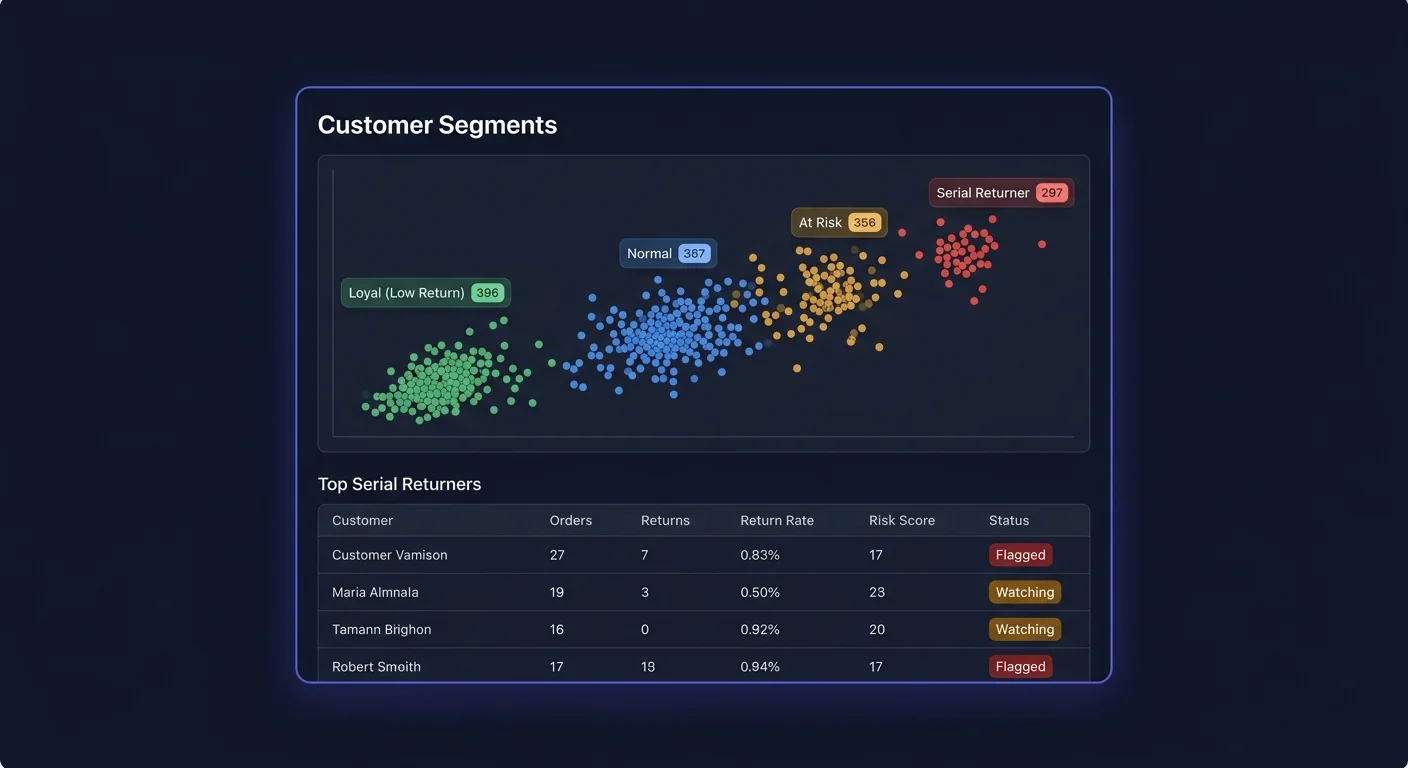
The Four Segments
| Segment | Return rate definition | Description | |---|---|---| | Champions | Under 5% (or under 0.5x store average) | Loyal buyers who almost never return. Your highest-LTV customers. | | Standard | 5–20% (or 0.5x–2x store average) | Typical customers within normal return behavior range. | | At Risk | 20–40% (or 2x–4x store average) | Return rate rising or already elevated. Often has a fixable root cause. | | Serial Returners | Over 40% (or over 4x store average) | Habitual returners — may be wear-and-return, size bracketing, or return fraud. |
Thresholds are calculated relative to your store's overall return rate. If your store average is 12%, "At Risk" starts at 24% (2x) and "Serial Returner" at 48% (4x). You can override these with absolute values under Settings → Customer Segments.
How Risk Scores Are Calculated
Each customer receives a risk score from 0 to 100. The score is a weighted combination of six signals:
Signal 1: Return Rate (Primary — 35% weight)
Returns as a percentage of total orders placed over the customer's lifetime. This is the primary input. A customer who has placed 10 orders and returned 4 has a 40% lifetime return rate.
Why lifetime vs. recent? Recent behavior matters more (see Signal 2), but lifetime rate provides the baseline. A customer with a 15% lifetime rate who recently jumped to 40% over 3 orders is weighted differently from a customer who has consistently returned at 40% over 20 orders.
Signal 2: Return Recency (20% weight)
Recent returns weight more heavily than old ones. The scoring uses an exponential decay: a return in the last 30 days counts 3x more than one from 90 days ago, and 10x more than one from 180 days ago.
This means a customer who stopped returning a year ago will see their risk score fall over time, even without additional orders. ReturnShield re-evaluates risk scores after each new order and return.
Signal 3: Return Pattern (20% weight)
The pattern of returns matters, not just the rate. Signals that add to the pattern score:
| Pattern | What it signals | |---|---| | Multiple size variants of same product returned | Bracketing — ordering sizes to keep one and return the rest | | Returns immediately after delivery (within 48 hours) | Wear-and-return — item was used immediately and returned | | Returns without tracking confirmation | Potential non-return claim | | Returns that increase in value over time | Escalating pattern — customer may be testing store tolerance | | Returns on items from different product categories | Less likely to be product-specific; more likely to be behavioral |
Signal 4: Order Value vs. Refund Value Ratio (10% weight)
Customers who return disproportionately high-value items relative to what they keep receive a higher score. Example: a customer who has placed $2,000 in orders and returned $1,400 worth (70% by value) scores higher than one who returned $400 of $2,000 (20% by value), even if their return rate by order count is similar.
Signal 5: Return Reason Quality (10% weight)
Customers who frequently provide no return reason, or provide vague reasons ("didn't like it" vs. "runs 2 sizes small in the shoulders"), score slightly higher. Specific, product-relevant reasons suggest genuine product problems rather than behavioral patterns.
Signal 6: Customer Tenure and Volume (5% weight)
New customers (fewer than 3 orders) are not scored as high-risk even if their early orders include returns — new customers often need one or two orders to understand sizing. Established customers with long histories that turn negative are scored more harshly than new customers with the same recent behavior.
Viewing the Segment List
Navigate to Customers → Segments in ReturnShield to see all customers with their tier assignments.
| Column | Description | |---|---| | Customer | Name (anonymized on Free plan — shows "Customer #1234") | | Segment | Current tier badge | | Risk score | 0–100 numeric score | | Return rate | Lifetime returns ÷ lifetime orders | | Last return | Date of most recent processed return | | Total returns | Count of completed returns | | LTV | Revenue retained (total paid minus refunds) | | Orders | Total order count | | Avg order value | Average order value for kept orders |
Sort by any column. Use the segment filter tabs to view one tier at a time.
Actions for Each Segment
Champions
Champions are your most valuable customers and the ones most likely to drive word-of-mouth. They deserve recognition.
Recommended actions:
- Enroll in a VIP or loyalty tier with early access to new collections
- Send them personalized "thank you" emails after milestone purchases (5th order, 1-year anniversary)
- Request reviews — Champions are your happiest customers and most likely to leave detailed, useful reviews
- Use them as a benchmark: when a new product launches, check whether Champions are returning it at a higher rate than usual (a signal that even your most satisfied customers found a problem)
What to avoid: Champions generally do not need intervention. Over-communicating with them or adding friction (like requiring review photos for returns) can damage the relationship.
Standard
Standard customers are the majority of your buyer base. They return at a normal rate with no particular pattern that requires intervention.
Recommended actions:
- Monitor for movement into the At Risk tier — a Standard customer who returns two consecutive orders may be experiencing a product-specific issue rather than a behavioral change
- Ensure the general purchase experience (shipping speed, packaging, product accuracy) remains strong — Standard customers are most sensitive to experience degradation
What to monitor: In ReturnShield's segment view, filter Standard customers by "return rate trend: worsening" to catch movement before it becomes a problem.
At Risk
At Risk customers have an elevated return rate that has not yet become habitual. This is the highest-value intervention target — the return pattern is established enough to be real, but not so entrenched that it cannot be addressed.
Root cause analysis first: Before taking action on an At Risk customer, check what products they returned and what reason they gave. Many At Risk customers have returned the same product category repeatedly (suggesting a product-level fit issue, not a behavioral problem) or have only escalated their return rate recently after a specific experience.
Recommended actions:
-
Shopify Flow tagging: Add an
at-risk-customerorder tag when they place a new order. Your fulfillment team can add a care card or sizing insert to the shipment. -
Earlier "How's it fit?" email: Instead of your standard 7-day post-delivery email, trigger at 3–4 days for At Risk customers. Reaching them before the return decision window closes often surfaces a sizing issue that can be resolved with an exchange rather than a return.
-
Product recommendation adjustment: If an At Risk customer's returns are clustered in one category (e.g., always returns shirts but keeps pants), avoid recommending shirts in future email campaigns.
-
Proactive exchange offer: When an At Risk customer initiates a return, trigger an automatic email from your customer service team offering to exchange for a different size before processing the return.
Serial Returners
Serial Returners require individual judgment. Some are genuinely difficult customers; others are committing return fraud (wear-and-return, size bracketing, address manipulation, or filing false "not received" claims). Many are simply customers whose expectations consistently do not match your products — a genuine product-market fit problem for that specific customer.
Recommended actions:
| Action | When to use | |---|---| | Shorter return window | For confirmed high-volume returners where a stricter policy is justified | | Photo required for return | For customers suspected of wear-and-return; requires documented condition | | Fulfillment hold for review | Trigger via Shopify Flow on new orders — warehouse team reviews before picking | | Customer account restriction | Shopify's built-in feature for customers blocked from purchasing | | Direct outreach | For long-term customers who have recently changed behavior — sometimes a conversation resolves a pattern |
What ReturnShield does NOT do: ReturnShield never automatically blocks or penalizes any customer. It surfaces the data and segment assignment — your team decides what, if any, action to take. This is intentional: automated customer penalties based on AI scoring carry legal and reputational risk that should remain under human control.
Bracketing Detection
Bracketing is when a customer orders multiple sizes or colors of the same product with the intent to keep one and return the rest. It inflates return rates without representing genuine product problems.
How Bracketing Is Detected
ReturnShield flags a customer for bracketing when either condition is met:
- Single-order bracketing: 3 or more variants of the same product in one order (configurable threshold under Settings → Fraud → Bracketing)
- Cross-order bracketing: A customer repeatedly orders 2+ sizes of the same product type across different orders and returns all but one each time
Flagged customers appear in the Fraud Signals panel accessible from the customer detail view.
Distinguishing Bracketing from Legitimate Behavior
A customer buying two sizes of a shirt is not automatically a bracket buyer. Signals that distinguish:
| Likely bracketing | Likely legitimate | |---|---| | Customer has done this 3+ times across different products | First time with a new brand or size category | | Returns arrive within 48 hours of delivery | Returns initiated weeks after delivery | | Return notes are vague ("wrong size") on every return | Specific notes explaining fit issue | | Customer has Serial Returner or At Risk tier | Customer is Champion or Standard | | Order contains many sizes (S, M, L, XL all in one order) | Two adjacent sizes (M and L — could be genuine uncertainty) |
Email Marketing Integration
ReturnShield writes the returnshield.risk_tier Shopify customer metafield with one of four values:
| Value | Segment |
|---|---|
| champion | Champions |
| standard | Standard |
| at_risk | At Risk |
| serial_returner | Serial Returners |
This metafield is readable by Klaviyo, Omnisend, and any email platform that syncs Shopify customer data. Build segments in your email tool using this property to personalize campaigns:
Example Klaviyo segment flows:
- Champions → VIP early access email → New collection preview 48 hours before public launch
- At Risk (recently elevated) → Sizing guide email → Triggered after their next purchase
- Serial Returner (new classification) → Customer service proactive outreach → Internal team notification
Segment Export
Export any segment to CSV for use in loyalty platforms, spreadsheet analysis, or importing into CRM tools:
- Go to Customers → Segments
- Select the segment tab (Champions, Standard, At Risk, or Serial Returners)
- Apply any additional filters (e.g., minimum LTV, specific product category)
- Click "Export CSV"
The export includes customer name, email, risk score, return rate, LTV, order count, last order date, and segment assignment date.
How Segments Update
Segment assignments are not static. ReturnShield re-evaluates each customer's risk score:
- After every new return is processed in Shopify
- After every new order is placed (new orders dilute return rate over time for customers who stop returning)
- Nightly batch re-calculation for recency decay (older returns count less over time)
A customer who has been in the Serial Returner tier but stops returning for six months will see their score decay and may re-enter the At Risk or Standard tier. Their Shopify metafield is updated automatically.
Next Steps
- Shopify Flow Integration — automate actions based on segment triggers
- Configuration — adjust segment thresholds and bracketing sensitivity
- AI Action Queue — fix the product issues driving At Risk customers