Tax Compliance
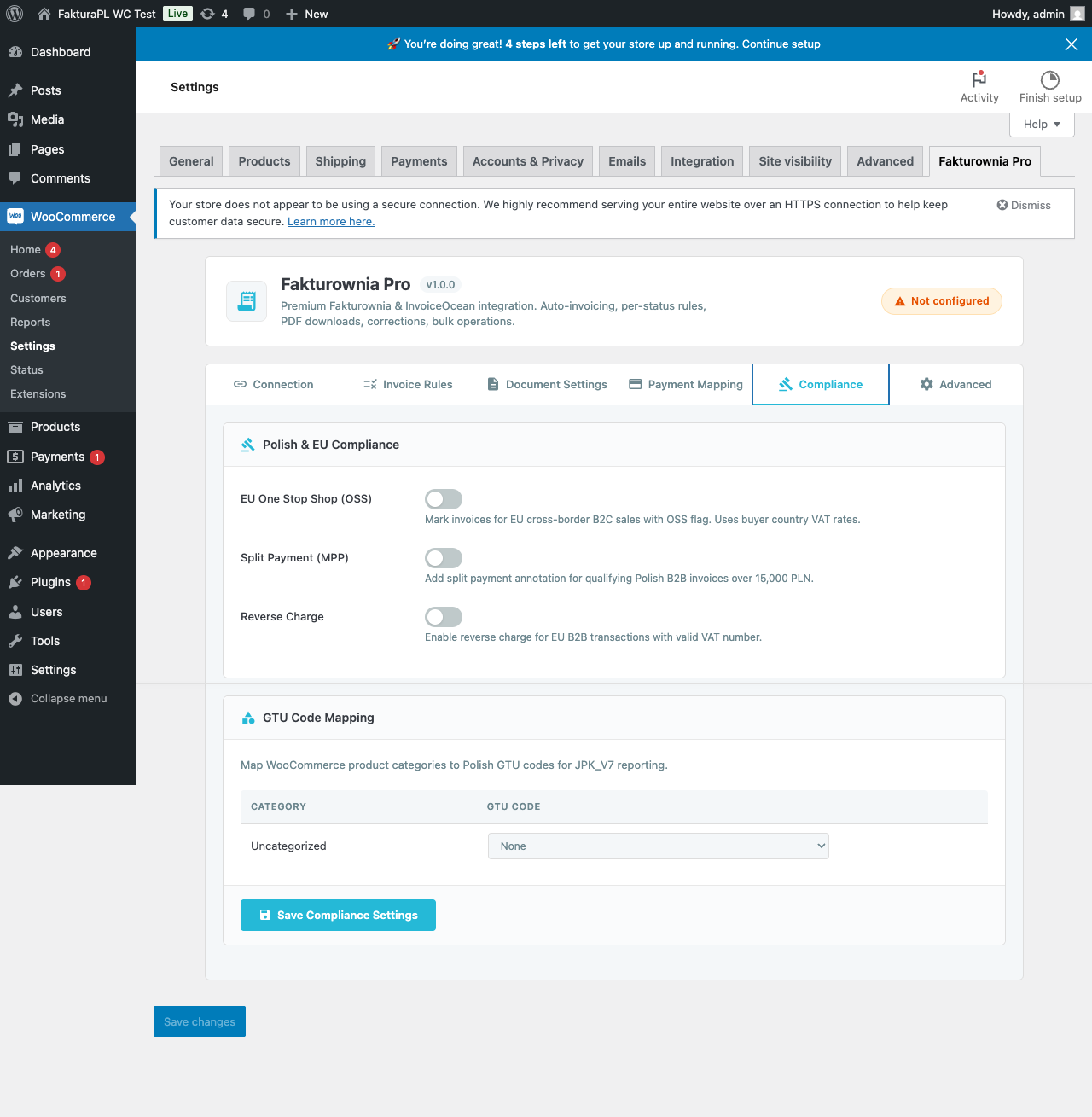
Fakturownia Pro is built for Polish merchants selling across the EU. This page covers every compliance feature in detail: EU OSS one-stop shop reporting, Polish split payment (MPP), GTU product codes for JPK_VAT, reverse charge for intra-EU B2B, VAT-exempt sales, and NIP collection at Shopify checkout.
NIP Collection at Shopify Checkout
Collecting the buyer's NIP (Numer Identyfikacji Podatkowej) at checkout is necessary for B2B invoices where the buyer requires their company tax ID on the document.
How It Works on Shopify
Shopify's native checkout does not have a dedicated NIP field. Fakturownia Pro adds NIP collection in two ways:
Option 1: Custom checkout field (Shopify Plus): On Shopify Plus, Fakturownia Pro injects a NIP field into checkout using Shopify's checkout extensibility API. The field appears in the billing section with format validation.
Option 2: Order notes field: For non-Plus plans, instruct customers to enter their NIP in the order notes field (clearly labeled "NIP / Tax ID for invoice" in your checkout instructions). Fakturownia Pro reads the order note field and extracts any string matching the NIP format \d{10} or \d{3}-\d{3}-\d{2}-\d{2}.
Option 3: Post-purchase via draft order: For high-value B2B orders, some merchants follow up with a Shopify draft order that includes a custom NIP field before generating the invoice. This is a manual workflow but guarantees clean NIP data.
NIP Format Validation
Fakturownia Pro validates NIPs using the official 10-digit checksum algorithm:
- Digits: d1 d2 d3 d4 d5 d6 d7 d8 d9 (check digit d10)
- Checksum: (6d1 + 5d2 + 7d3 + 2d4 + 3d5 + 4d6 + 5d7 + 6d8 + 7d9) mod 11 = d10
- If the result is 10, the NIP is invalid
Invalid NIPs are flagged in the order notes but do not block invoice creation — a warning appears in the Fakturownia Pro activity log for that order.
How Shopify Checkout NIP Differs from PrestaShop
On PrestaShop, Fakturownia Pro for PrestaShop can add a dedicated NIP field with real-time validation during the checkout process because PrestaShop's checkout is fully customizable at the PHP level.
On Shopify, the checkout is a hosted Shopify-controlled page. The NIP field approach is therefore more limited for non-Plus stores. If NIP collection at checkout is critical for your B2B Shopify store, Shopify Plus with checkout extensibility is the recommended path.
EU OSS — One-Stop Shop
The EU OSS scheme applies to Polish merchants selling to private consumers (B2C) in other EU member states. Under OSS, you declare and pay VAT centrally in Poland for all cross-border EU B2C sales, rather than registering in each destination country.
When OSS Applies
All three conditions must be met:
- The customer is a private individual (no EU VAT number)
- The customer's billing address is in an EU member state other than Poland
- Your store is established in Poland (registered there)
OSS does not apply to:
- Sales to the UK, Norway, Switzerland, or other non-EU countries
- Sales where the buyer provides a valid EU VAT number (those are intra-community B2B supplies — handled by Reverse Charge)
- Sales where goods are shipped from outside the EU (different rules apply)
Enabling OSS in Fakturownia Pro
- Go to Settings → Compliance
- Toggle "Enable EU OSS"
- Select your country of establishment (Poland for most users)
- Click Save
How It Works
When OSS is active, Fakturownia Pro checks each order:
- Is the billing country an EU member state different from Poland? If not: standard Polish VAT applies.
- Does the buyer have a valid EU VAT number? If yes: skip OSS, apply Reverse Charge instead.
- If both conditions pass: the invoice is created with the VAT rate of the buyer's destination country.
The VAT rate lookup uses Fakturownia's built-in EU VAT rate table, updated whenever member state rates change. You do not need to maintain this table manually.
OSS vs. PrestaShop: Key Difference
On PrestaShop, OSS detection can be more granular because PrestaShop's checkout exposes more customer data earlier in the flow. On Shopify, OSS detection is based on the billing address country recorded on the order at the time the invoice rule fires. If the billing address differs from the shipping address (common for gifts), the billing country determines OSS applicability — this is correct per EU OSS rules.
OSS Quarterly Reporting
Fakturownia generates quarterly OSS summary reports from your invoice data. Export from Fakturownia → Reports → EU OSS Summary and file the VAT-OSS declaration through the Polish e-Urząd Skarbowy portal.
Split Payment — MPP (Mechanizm Podzielonej Płatności)
Split payment is mandatory in Poland for B2B invoices meeting both conditions:
- Gross invoice amount exceeds 15,000 PLN
- The invoice includes goods or services listed in Annex 15 of the Polish VAT Act
What Split Payment Means for the Buyer
When split payment applies, the buyer must transfer the payment in two parts:
- The net amount goes to your regular bank account
- The VAT amount goes to your dedicated VAT account (rachunek VAT)
The invoice must include the statutory notice: "mechanizm podzielonej płatności" in the payment notes.
Enabling MPP
- Go to Settings → Compliance
- Toggle "Enable Split Payment (MPP)"
- Set the threshold (default: 15,000 PLN)
- Click Save
Fakturownia Pro applies MPP automatically to invoices that exceed the threshold. For orders in foreign currencies, the gross amount is converted to PLN using the NBP mid-rate on the invoice date to determine whether the threshold is exceeded.
Annex 15 Products
MPP is only mandatory for goods and services listed in Annex 15 of the VAT Act. This includes:
- Electronic goods (phones, tablets, laptops, components)
- Steel and metal products
- Fuel and energy products
- Construction materials
- Certain chemical and pharmaceutical products
For software licenses and digital goods, MPP is generally not mandatory — but it can be applied voluntarily. Confirm with your accountant whether your specific product categories fall under Annex 15.
GTU Codes
GTU codes (Grupy Towarów i Usług) are mandatory identifiers in JPK_VAT reporting for specific goods and service categories. Invoices for GTU-applicable products must include the code on each relevant line item.
Complete GTU Code Reference
| Code | Category | |---|---| | GTU_01 | Alcoholic beverages (alcohol content above 1.2%, wines, beer, spirits) | | GTU_02 | Goods from Art. 103(5aa) — including fuels listed specifically | | GTU_03 | Heating oil, lubricants, and specific chemical products | | GTU_04 | Tobacco products, electronic cigarettes, heating tobacco | | GTU_05 | Waste and secondary raw materials (scrap metal, plastic waste, etc.) | | GTU_06 | Electronic devices subject to reverse charge (computers, phones, game consoles, tablets) | | GTU_07 | Vehicles, vehicle parts, and accessories | | GTU_08 | Precious metals, semi-precious stones, and base metals | | GTU_09 | Pharmaceuticals, medical devices, and vaccines | | GTU_10 | Buildings, structures, and building land | | GTU_11 | Electricity, natural gas, steam, and heating | | GTU_12 | Intangible services: IT services, consulting, legal, accounting, advertising, and market research | | GTU_13 | Transport and logistics services (road, rail, air, sea) |
Assigning GTU Codes in Fakturownia Pro
GTU codes are mapped at the product category level:
- Go to Settings → Compliance → GTU Codes
- Click "Add Mapping"
- Select a Shopify product type or collection from your store
- Assign the appropriate GTU code
- Click Save
When an invoice is generated, Fakturownia Pro checks each line item against your mappings and applies the correct GTU code. A product can have only one GTU code. If a product matches multiple mappings (belongs to a collection that maps to GTU_07 AND has a product type mapped to GTU_12), the product type mapping takes precedence over the collection mapping.
Verifying GTU on Invoices
After generating an invoice, open it in Fakturownia and inspect the JPK section to confirm GTU codes appear on the correct line items before submitting your JPK_VAT monthly file.
GTU for Software Licenses
For software license sales, GTU_12 (intangible services including IT services and software) is the standard code. However, physical software media or hardware bundled with software may require GTU_06 (electronic devices). Confirm with your accountant for your specific product mix.
Reverse Charge (Odwrotne Obciążenie)
Reverse charge applies when:
- The buyer has a valid EU VAT number from an EU member state other than Poland
- The supply is of goods or services subject to the reverse charge mechanism
Under reverse charge, the seller issues a zero-VAT invoice. The buyer accounts for VAT in their own country. This is the standard treatment for intra-EU B2B supplies.
Enabling Reverse Charge
- Go to Settings → Compliance
- Toggle "Enable Reverse Charge"
- Click Save
When active, Fakturownia Pro checks each order for a buyer EU VAT number. The check looks in:
- The order's company name field for a VAT number in EU format
- The NIP/VAT field (if collected via the checkout NIP mechanism)
- The billing address country (to confirm it is an EU member state)
If a valid intra-EU VAT number is detected, the invoice is issued with:
- VAT rate set to 0% (zw) on all line items
- Tax column hidden on the PDF
- Annotation:
"Reverse charge — Art. 44 Directive 2006/112/EC"
VAT Number Validation via VIES
Fakturownia Pro validates EU VAT numbers via the VIES (VAT Information Exchange System) database before applying reverse charge. If VIES is temporarily unavailable (it has known stability issues), the VAT number is accepted as entered and flagged for manual review in the app's compliance log. Always verify manually when VIES flags an error — the number may still be valid.
VAT-Exempt Sales
For B2B sales where the supply is VAT-exempt under Polish law (Art. 43 of the Polish VAT Act):
- Go to Settings → Compliance → VAT Exemption
- Toggle "Apply VAT Exemption"
- Select the exemption basis from the Art. 43 clause dropdown
The selected basis is printed on the invoice: "Zwolnienie z VAT na podstawie art. 43 ust. 1 pkt X ustawy o VAT."
Common exemption bases: Art. 43 ust. 1 pkt 1 (medical services), pkt 17 (financial services), pkt 26 (educational services). Confirm the correct clause with your accountant.
Compliance Checklist
Use this checklist when setting up a new store or expanding to new markets:
- [ ] OSS enabled if selling B2C to any EU country outside Poland
- [ ] Country of establishment set correctly (should match your VAT registration)
- [ ] MPP enabled if selling goods/services in Annex 15 categories in Poland
- [ ] GTU codes mapped for all product categories that require them
- [ ] GTU mappings verified in Fakturownia after first invoice generation
- [ ] Reverse Charge enabled if accepting EU VAT numbers at checkout
- [ ] VAT exemption configured if your products qualify under Art. 43
- [ ] Test invoice generated and reviewed in Fakturownia before live orders
Next Steps
- Invoice Rules — configure when invoices are created
- Configuration — document settings and seller information
- Troubleshooting — wrong VAT rate, OSS not applying