Polish and EU Tax Compliance Guide
Fakturownia Pro's Compliance tab handles the tax reporting obligations that matter most for Polish e-commerce stores and EU-registered businesses. This guide explains every feature in depth: what it is, when it applies to your store, how to configure it, and practical examples to validate your setup.
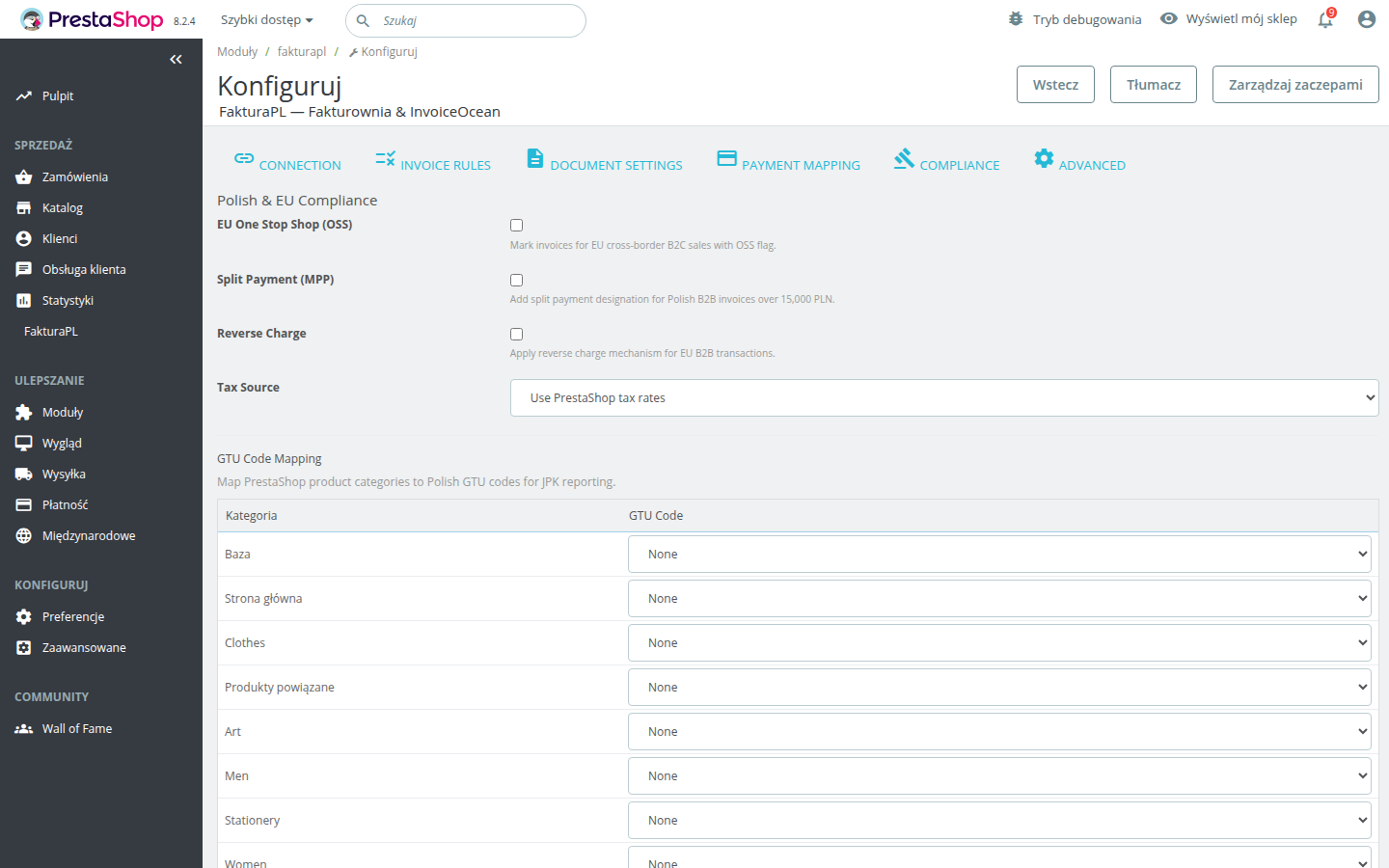
All settings in this guide are found under Modules → Module Manager → Fakturownia Pro → Configure → Compliance tab.
EU OSS — One Stop Shop
What is EU OSS?
The EU One Stop Shop (OSS) scheme simplifies VAT reporting for cross-border B2C digital sales and distance sales within the EU. Before OSS, selling to consumers in other EU countries required registering for VAT in each destination country once you exceeded their distance selling threshold. OSS replaces that with a single quarterly return filed in Poland covering all your EU cross-border B2C sales.
The threshold: If your total cross-border B2C sales within the EU exceed €10,000 in a calendar year (or in the previous calendar year), OSS or per-country registration becomes mandatory. Below this threshold, you can charge Polish VAT on all EU sales regardless of the buyer's country.
OSS eligibility flowchart
Is the buyer in another EU country?
  └─ No → Standard Polish VAT applies. OSS does not apply.
  └─ Yes →
      Does the buyer have a valid EU VAT number (B2B)?
        └─ Yes → This is a B2B intra-community supply. Use Reverse Charge, not OSS.
        └─ No (B2C) →
            Are your cross-border B2C sales above €10,000/year?
              └─ No → You can charge Polish VAT. OSS optional.
              └─ Yes →
                  Are you registered for OSS?
                    └─ Yes → Enable EU OSS in Fakturownia Pro.
                    └─ No → Register first at podatki.gov.pl, then enable.
Configuring EU OSS in Fakturownia Pro
- Go to Compliance tab
- Enable the EU OSS toggle
- Save configuration
When enabled, Fakturownia Pro evaluates each invoice before creation:
- Is the buyer's country different from your store's home country (Poland)? If not — standard Polish VAT, no OSS.
- Is the buyer's country an EU member state? If not (UK, Norway, Switzerland, Jersey, etc.) — export rules apply, not OSS.
- Does the buyer have a VAT number? If yes — Reverse Charge applies, not OSS.
When all conditions point to OSS, the invoice is flagged with the OSS designation, which Fakturownia uses in your quarterly OSS report and JPK export.
VAT rates by country
When OSS is active, invoices for EU buyers must use the VAT rate of the buyer's country, not Poland's 23%. Fakturownia handles this automatically based on the buyer's country on the invoice — it applies the correct VAT rates for that EU member state.
Standard EU VAT rates (as of 2026):
| Country | Standard VAT rate | |---|---| | Germany | 19% | | France | 20% | | Netherlands | 21% | | Czech Republic | 21% | | Sweden | 25% | | Denmark | 25% | | Hungary | 27% | | Romania | 19% | | Italy | 22% | | Spain | 21% |
Verify the current rates in your Fakturownia account (Settings → Tax rates) — EU member states occasionally adjust rates.
Practical example: Polish software store selling to German consumers
A Polish store selling WordPress plugins charges a German consumer €50. With OSS enabled:
- Invoice is flagged for OSS
- VAT is calculated at 19% (German rate): €7.98 tax, €42.02 net
- Total invoice: €50.00
- This transaction appears in your quarterly OSS return under Germany
- Payment: €50 from the customer, of which you remit €7.98 to the Polish tax authority via OSS (which distributes it to Germany)
The same customer places a second order of €200:
- Same process — OSS applies, German rate, OSS report
A German company (with DE VAT number, e.g., DE123456789) orders €500 of plugins:
- This is B2B — Reverse Charge applies, not OSS
- Invoice is zero-rated, no OSS flag
- German company reports the VAT in Germany
GTU Codes — JPK_VAT Reporting
What are GTU codes?
GTU (Grupy Towarów i Usług) codes are a Polish tax classification system mandatory since October 2020 as part of the new JPK_VAT format (JPK_V7). Each code identifies a specific category of goods or services that the Polish tax authority (Krajowa Administracja Skarbowa) wants tracked in VAT returns for VAT fraud prevention purposes.
If your store sells products in any of the 13 GTU categories, the relevant invoice lines must carry the correct GTU code on every VAT invoice. Missing GTU codes during a JPK audit can result in penalties under art. 109b ust. 9 of the Polish VAT Act.
Complete GTU code table
| Code | Category | Examples | |---|---|---| | GTU_01 | Alcoholic beverages (above 1.2% ABV) | Wine, beer, spirits, liqueurs | | GTU_02 | Petroleum products and lubricants (CN 2710, 2905 11 00, 3403) | Petrol, diesel, motor oil, lubricants | | GTU_03 | Heating oil (CN 2710 19 71–98), natural gas (CN 2711) | Fuel oil, heating oil, LPG | | GTU_04 | Tobacco products (CN 2401–2404), electronic cigarettes | Cigarettes, cigars, vaping devices, nicotine pouches | | GTU_05 | Waste (as per ustawa o odpadach art. 2 pkt 1) | Scrap metal, electronic waste, used batteries, plastic waste | | GTU_06 | Electronic devices susceptible to VAT fraud | Mobile phones, tablets, laptops, game consoles, processor units (CN 8471, 8517, 8528) | | GTU_07 | Vehicles and vehicle parts | Cars, trucks, motorcycles, vehicle engines, gearboxes | | GTU_08 | Precious metals and alloys | Gold, silver, platinum, palladium, rhodium, jewelry components | | GTU_09 | Medicines and medical devices (as per Prawo farmaceutyczne) | Prescription drugs, OTC medications, medical equipment, test kits | | GTU_10 | Buildings and structures, land parcels | Real estate transfers, construction services on buildings | | GTU_11 | Carbon emission allowances (EU ETS) | CO2 emission certificates, carbon credits | | GTU_12 | Intangible services listed in art. 28l ustawa VAT | IT services, consulting, financial services, legal services, R&D, marketing, management, training, accounting, telecom, transport, real estate services | | GTU_13 | Road transport services for goods (transport drogowy towarów) | Trucking, freight forwarding, last-mile delivery |
Software licenses and digital products fall under GTU_12. If your store sells software, SaaS subscriptions, cloud services, digital downloads, IT consulting, or any of the GTU_12 service types listed in art. 28l, every invoice line for those products must carry GTU_12.
Who does NOT need GTU codes?
Stores selling:
- Physical consumer goods not in categories GTU_01 through GTU_13 (clothing, furniture, books, food)
- Standard retail products without electronics in GTU_06
- Services not listed in art. 28l ustawa VAT
If your entire product catalogue falls outside the GTU categories, leave all GTU mappings unset — adding incorrect GTU codes is a compliance error just as bad as missing them.
Configuring GTU codes
In the Compliance tab, map each PrestaShop product category to the relevant GTU code:
- Open the GTU Mapping section
- For each category in your dropdown, select the GTU code that applies
- Leave blank for categories that do not fall under any GTU group
- Save
Example configuration for a software store:
| PrestaShop category | GTU mapping | |---|---| | Software Licenses | GTU_12 | | SaaS Subscriptions | GTU_12 | | IT Consulting | GTU_12 | | Hardware (computers) | GTU_06 | | Accessories (cables, bags) | (none) | | Gift Cards | (none — gift cards are a payment method, not a product) |
Validating GTU code setup
After configuring:
- Place a test order with a product from each mapped category
- Trigger the VAT invoice creation rule
- Open the invoice in Fakturownia and confirm the GTU codes appear on the relevant line items
- Go to Fakturownia → Reports → JPK preview and confirm the GTU codes appear correctly in the XML structure
Tip: Your accountant (księgowy) should review your GTU mapping before you go live — they know your product classification better than any technical guide can. Ask them to confirm which categories apply to your specific product range.
Split Payment — Mechanizm Podzielonej Płatności (MPP)
What is split payment?
The Polish split payment mechanism (MPP) is a mandatory safeguard against VAT fraud on high-value B2B transactions. Under art. 108a–108e of the Polish VAT Act, for B2B invoices exceeding 15,000 PLN gross for goods and services listed in Annex 15, the invoice must carry the annotation "mechanizm podzielonej płatności". The buyer is then required (and legally enabled) to split their bank payment between your regular account (net amount) and your VAT account (VAT amount).
Annex 15 products — does this apply to your store?
Annex 15 covers categories prone to VAT carousel fraud. Key items:
- Electronic goods: mobile phones, tablets, laptops, game consoles, processors, hard drives
- Steel and metal products
- Fuel, heating oil, liquid gas
- Plastic waste
- Building services
- Trading in emission allowances
Software licenses, digital services, and most standard consumer goods are NOT in Annex 15. For a software store, MPP typically does not apply even if invoices exceed 15,000 PLN. For an electronics reseller, it very likely does apply. Consult your accountant to confirm.
Threshold examples
| Invoice gross total | MPP annotation required? | |---|---| | PLN 12,000 | No — below threshold | | PLN 15,000 | No — must exceed 15,000 (not equal) | | PLN 15,001 | Yes — add annotation | | PLN 50,000 | Yes | | EUR 3,500 (approx. PLN 16,000) | Yes, if PLN equivalent exceeds 15,000 |
For multi-currency stores, the PLN equivalent at the exchange rate on the invoice date is used to evaluate the threshold. The exchange rate is taken from the National Bank of Poland (NBP) average rate for the invoice date.
Configuring split payment
In the Compliance tab, enable Split Payment (MPP). Once enabled:
- Invoices below 15,000 PLN gross: no annotation added
- Invoices above 15,000 PLN gross: "mechanizm podzielonej płatności" is added automatically to the invoice description
No additional per-product configuration is needed — the threshold check is automatic. The annotation appears on the invoice PDF and in the JPK XML.
Reverse Charge — EU Intra-Community B2B Supplies
What is reverse charge?
The EU reverse charge mechanism (odwrotne obciążenie in Polish) shifts VAT liability from the seller to the buyer for intra-EU B2B supplies. Under art. 138 of EU Directive 2006/112/EC, when a VAT-registered Polish business sells goods or services to a VAT-registered business in another EU member state:
- The Polish seller issues a zero-rated invoice (no VAT charged)
- The buyer reports "acquisition VAT" in their own country's return
- The Polish seller does not need to register for VAT in the buyer's country
This mechanism prevents double taxation and eliminates the need for Polish B2B exporters to register for VAT in every EU country where they have corporate customers.
VIES validation steps
Before issuing a reverse charge invoice, the buyer's EU VAT number must be valid. Fakturownia Pro passes the buyer's VAT number to Fakturownia, which validates it against the EU VIES database (ec.europa.eu/vies).
Manual VIES check (before the first sale to a new B2B customer):
- Go to ec.europa.eu/taxation_customs/vies
- Select the buyer's country
- Enter the VAT number without the country prefix (e.g., for DE123456789, enter 123456789 and select Germany)
- Click "Verify" — a green result confirms the number is valid and active
- Keep a record of the verification date and result for your tax records
Fakturownia does this automatically for each invoice, but a manual pre-sale check is good practice for new customers, as the VIES database has a small delay on newly registered numbers.
How reverse charge is applied
When Reverse Charge is enabled in Fakturownia Pro and a buyer's VAT number is from a different EU member state:
- All invoice line items have their tax rate set to exempt (zw / 0%)
- The VAT column is hidden on the invoice PDF
- The invoice description includes: "Odwrotne obciążenie / Reverse charge — Art. 138 Dyrektywy 2006/112/WE"
- The invoice is marked as an intra-community supply in Fakturownia's JPK export
If the VAT number cannot be verified: The invoice is created with standard Polish VAT rates and a flag is added to the Fakturownia record for manual review. You should not ship the order until the VAT number is confirmed — selling to an unverifiable VAT number with zero-rated invoicing creates tax liability for your company.
Practical example
A Polish software store sells an annual software license (€1,200) to a German company (DE123456789):
- Invoice: €1,200.00 net, 0% VAT (exempt), total €1,200.00
- Description includes the reverse charge annotation
- This sale appears in your JPK as an intra-community supply
- The German company reports the purchase on their Zusammenfassende Meldung (ZM) / recapitulative statement
- No VAT is remitted to any tax authority by your store
The same German consumer (no VAT number) buys the same license:
- Invoice: €1,200.00 net, 19% German VAT (via OSS), total €1,428.00
- OSS flagged — you remit €228.00 to German tax authority via OSS return
KSeF — Krajowy System e-Faktur
What is KSeF?
KSeF (Krajowy System e-Faktur) is Poland's national structured electronic invoicing system. It replaces traditional PDF invoices for Polish B2B transactions with structured XML e-faktury submitted through the government's central repository.
Timeline (as of early 2026):
- KSeF has been mandatory since 1 February 2026 for large taxpayers (annual turnover above PLN 200M)
- Mandatory rollout for remaining taxpayers is scheduled throughout 2026
- Check the current Ministry of Finance (Ministerstwo Finansów) schedule for your company's specific obligation date
How Fakturownia handles KSeF
Fakturownia.pl has native, certified KSeF integration. When KSeF mode is enabled in your Fakturownia account, every invoice created via the API (including those created by Fakturownia Pro) is automatically submitted to KSeF and receives a KSeF reference number (numer KSeF) in response.
No additional configuration is required inside Fakturownia Pro — the KSeF submission happens inside Fakturownia's systems automatically. Fakturownia Pro creates the invoice via the standard Fakturownia API; Fakturownia handles the KSeF XML generation, digital signing, submission, and receipt of the KSeF number.
KSeF preparation checklist
Complete these steps before your KSeF obligation date:
- [ ] Confirm your obligation date with your accountant — check Ministerstwo Finansów guidelines for your turnover bracket
- [ ] Configure KSeF in Fakturownia — go to Fakturownia account → Settings → KSeF → follow Fakturownia's KSeF activation guide
- [ ] Grant KSeF authorisation — authorize Fakturownia to submit invoices on your behalf through the KSeF ministerial portal (e-Urząd Skarbowy)
- [ ] Ensure NIP numbers are collected at checkout — KSeF B2B invoices require the buyer's NIP. Enable the NIP field in Fakturownia Pro's Document Settings tab and ensure it appears at checkout
- [ ] Test in the KSeF test environment — Fakturownia provides a KSeF sandbox (test.ksef.mf.gov.pl). Create test invoices and confirm they are accepted before switching to production
- [ ] Review invoice numbering — KSeF has specific requirements. Fakturownia handles the numbering automatically; just ensure your Fakturownia numbering scheme is correctly configured
- [ ] Update your email templates — Invoices submitted through KSeF must reference the KSeF number. Fakturownia includes the KSeF number in emails automatically, but verify the template shows it correctly
B2C invoices and KSeF
For B2C invoices (consumers without NIP), KSeF is not required. Standard PDF invoices remain valid for all B2C transactions. Fakturownia Pro's KSeF submission through the Fakturownia API is only triggered for invoices that Fakturownia classifies as B2B (buyer has a NIP). B2C invoices in your Fakturownia account continue to work exactly as before.
Compliance Checklist for Polish Stores
| Requirement | Applies to | Action | |---|---|---| | EU OSS enabled | Cross-border B2C to EU, sales > €10k/year | Enable in Compliance tab; register with Urząd Skarbowy first | | GTU codes mapped | Products in GTU_01–GTU_13 categories | Map each product category in Compliance tab; verify with accountant | | Split Payment (MPP) | B2B invoices > 15,000 PLN, Annex 15 products | Enable in Compliance tab; verify product coverage with accountant | | Reverse Charge | B2B sales to VAT-registered EU companies | Enable in Compliance tab; verify VIES validation works | | NIP field at checkout | KSeF B2B invoices (mandatory from 2026) | Enable in Document Settings tab | | KSeF in Fakturownia | Polish B2B invoices (from obligation date) | Configure in Fakturownia account, not in the PrestaShop module | | OID Deduplication | All stores with payment gateway callbacks | Enable in Advanced tab |
Disclaimer: Tax law changes frequently and the above reflects the state of Polish and EU VAT regulations as of early 2026. Consult a qualified Polish tax advisor (doradca podatkowy) to confirm which requirements apply to your specific business, product range, and revenue levels before enabling compliance settings.
Next Steps
- Invoice Rules — set up the rules that trigger invoices for each order status
- Customer Dashboard — collecting NIP at checkout is required for KSeF compliance
- Configuration Guide — review Document Settings and Payment Mapping alongside compliance settings
- Troubleshooting — issues with compliance-related invoice content? Start here