Installation
Fakturownia Pro for Magento 2 is a standard Magento module delivered via a private Composer repository. Installation follows the conventional Magento deployment process: composer require followed by setup:upgrade, di:compile, and cache flush. Adobe Commerce Cloud users have additional deployment considerations covered at the end of this guide.
System Requirements
| Requirement | Minimum | Recommended | |---|---|---| | Magento Open Source / Adobe Commerce | 2.4.5 | 2.4.7+ | | PHP | 8.1 | 8.2+ | | Composer | 2.x | 2.x latest | | MySQL / MariaDB | 8.0 / 10.4 | Latest stable | | Elasticsearch / OpenSearch | 7.x | 8.x | | Fakturownia account | Any paid plan | Business / Enterprise | | PHP extensions | cURL, OpenSSL, JSON | — |
The module is tested against both Magento Open Source and Adobe Commerce. It does not use any Adobe Commerce-exclusive APIs.
Step 1: Add the Private Composer Repository
Fakturownia Pro for Magento 2 is hosted on plugkit.io's private Composer repository. Add it to your project:
composer config repositories.plugkit composer https://packages.plugkit.ioThis adds the repository to your project's composer.json. You can verify it was added:
composer config repositoriesAuthentication
Authenticate with your plugkit.io email and license key:
composer config http-basic.packages.plugkit.io your@email.com YOUR_LICENSE_KEYYour license key is found in plugkit.io → My Licenses → Fakturownia Pro Magento 2 → Composer Key.
This stores credentials in auth.json (or ~/.composer/auth.json for global setup). For CI/CD environments, set them as environment variables:
export COMPOSER_AUTH='{"http-basic":{"packages.plugkit.io":{"username":"your@email.com","password":"LICENSE_KEY"}}}'Step 2: Require the Module
composer require plugkit/fakturownia-pro-magento2Composer downloads the module and its dependencies. The module code is installed under app/code/Plugkit/FakturowniaProMagento2/ via the Magento autoloader mapping.
What gets installed:
- The module code in
app/code/Plugkit/FakturowniaProMagento2/ - No third-party PHP library dependencies — the module uses Magento's built-in HTTP client
Step 3: Enable the Module
bin/magento module:enable Plugkit_FakturowniaProMagento2Verify the module appears as enabled:
bin/magento module:status | grep PlugkitExpected: Plugkit_FakturowniaProMagento2 listed under "List of enabled modules."
Step 4: Run Setup Upgrade
bin/magento setup:upgradeThis step:
- Applies the module's declarative schema (
db_schema.xml) to create theplugkit_fakturownia_queueandplugkit_fakturownia_invoicestables - Registers the module in
setup_moduletable - Runs any declarative schema data patches (customer attribute for NIP, product attribute for GTU codes)
- Registers the
fakturownia_procron group
Expected new tables:
| Table | Purpose |
|---|---|
| plugkit_fakturownia_queue | Invoice generation job queue (pending, processing, failed, completed) |
| plugkit_fakturownia_invoices | Audit log of all invoice operations |
Step 5: Compile Dependency Injection
In production or developer mode with DI cache enabled:
bin/magento setup:di:compileThis generates interceptors for the module's plugins and proxies. It is a mandatory step — skipping it causes "Class not found" errors in production.
What DI compilation generates for this module:
- Interceptors for
DocumentGenerationService(used bySplitPaymentPluginandReverseChargePlugin) - Proxies for service contract implementations
- Type configuration for observer dependency injection
If compilation fails with "Circular dependency detected":
Error: Circular dependency between
Plugkit\FakturowniaProMagento2\Model\Service\DocumentGenerationService
and your_custom_module
Break the cycle with a proxy injection in your custom module's di.xml:
<argument name="fakturowniaService" xsi:type="object">
    Plugkit\FakturowniaProMagento2\Api\DocumentGenerationServiceInterface\Proxy
</argument>
Step 6: Deploy Static Content (Production Mode)
If your store runs in production mode:
bin/magento setup:static-content:deploy pl_PL en_US -fInclude all locales your store uses. The module adds configuration fields to Stores → Configuration — these use standard Magento adminhtml templates.
Step 7: Flush Cache
bin/magento cache:flushOr selectively:
bin/magento cache:clean config full_pageIf your store uses Redis for cache:
# Flush Magento config cache in Redis (typically DB 1)
redis-cli -n 1 FLUSHDB
Step 8: Configure API Connection
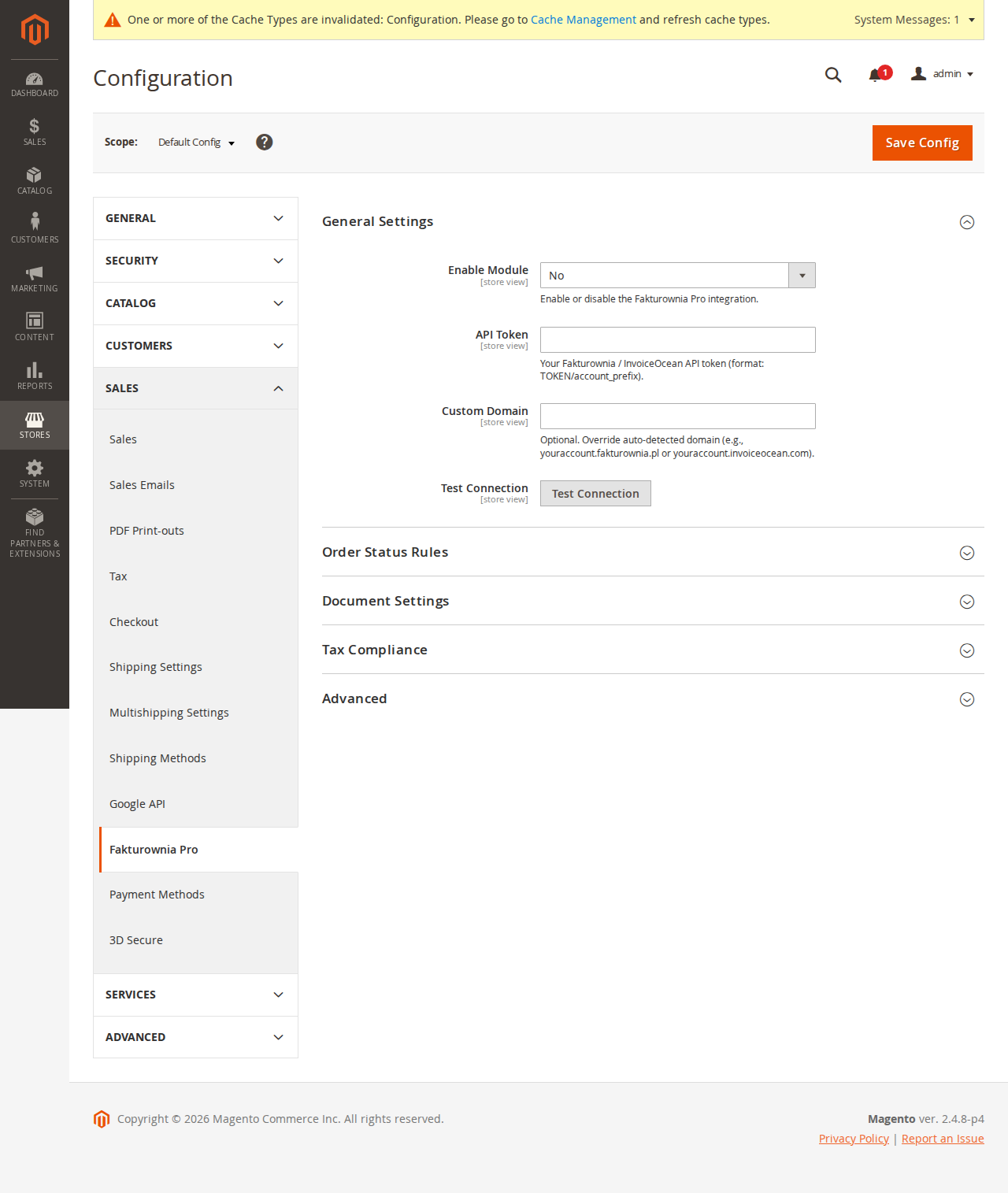
Navigate to Stores → Configuration → Plugkit → Fakturownia Pro → General.
Enter:
- API Token — from your Fakturownia account at Settings → Integration → API Authorization Code
- Subdomain — the part before
.fakturownia.pl(entermycompany, notmycompany.fakturownia.pl)
Click Save Config, then click "Test Connection". A green success message with your account name confirms the connection.
Store scope: Configuration is inheritable. Set the global default, then override per website or store view as needed. Use the Store View dropdown before saving to apply scope-specific settings.
Step 9: Verify Cron Groups
The module registers a fakturownia_pro cron group with three jobs. Verify the group runs:
bin/magento cron:run --group=fakturownia_proIf the command completes without errors, the group is operational. Verify the jobs are scheduled:
SELECT job_code, status, scheduled_at, executed_at
FROM cron_schedule
WHERE job_code LIKE '%fakturownia%'
ORDER BY scheduled_at DESC
LIMIT 10;
Registered cron jobs:
| Job code | Default schedule | Purpose |
|---|---|---|
| fakturownia_process_queue | Every minute | Processes pending invoice generation jobs |
| fakturownia_retry_failed | Every 5 minutes | Retries failed jobs up to the configured maximum |
| fakturownia_cleanup_logs | Daily 02:00 | Rotates log files older than 30 days |
Standard Magento cron entry (add to server crontab if not already set):
* * * * * php /var/www/magento/bin/magento cron:run 2>&1 | \
  grep -v "Ran jobs by schedule" >> /var/www/magento/var/log/magento.cron.log
Upgrading
To upgrade to a new version:
composer update plugkit/fakturownia-pro-magento2
bin/magento setup:upgrade
bin/magento setup:di:compile
bin/magento setup:static-content:deploy pl_PL en_US -f
bin/magento cache:flush
Always check the Changelog for breaking changes before upgrading. Major version upgrades (1.x to 2.x) may require manual migration steps.
Adobe Commerce Cloud Installation
On Adobe Commerce Cloud, the deployment process follows Magento's cloud deployment pipeline. The setup:upgrade and di:compile steps run automatically during deployment.
Pre-deployment (pre-deploy.sh or composer hooks):
# Ensure the package is in composer.json before deploying
composer require plugkit/fakturownia-pro-magento2 --no-update
composer update plugkit/fakturownia-pro-magento2
Build phase: The module is compiled by the standard setup:di:compile step in the build hook. No additional configuration is needed.
Post-deployment: Run bin/magento setup:upgrade after deployment in the deploy hook if it is not already included.
For ece-tools users, ensure the .magento.env.yaml does not exclude the fakturownia_pro cron group:
stage:
  deploy:
    CRON_CONSUMERS_RUNNER:
      cron_run: true
      max_messages: 100
Uninstallation
bin/magento module:disable Plugkit_FakturowniaProMagento2
composer remove plugkit/fakturownia-pro-magento2
bin/magento setup:upgrade
bin/magento setup:di:compile
bin/magento cache:flush
The uninstall removes module code but the database tables (plugkit_fakturownia_queue, plugkit_fakturownia_invoices) and any stored order extension attributes remain as historical records. Remove them manually with:
DROP TABLE IF EXISTS plugkit_fakturownia_queue;
DROP TABLE IF EXISTS plugkit_fakturownia_invoices;
Post-Installation Checklist
- [ ] API connection tested (green success message in Stores → Configuration)
- [ ] Cron group verified with
bin/magento cron:run --group=fakturownia_pro - [ ] Invoice column visible in admin orders grid
- [ ] Test order placed and invoice generated in Fakturownia
- [ ] Cron schedule visible in
cron_scheduledatabase table - [ ] Debug logging off in production (should be off by default)
- [ ] At least one invoice rule configured per order state you need to handle
Next Steps
- Configure the module settings — store scope, document settings, seller overrides
- Set up per-state invoice rules — observer-based triggering
- Configure compliance features — NIP, GTU, OSS, MPP, Reverse Charge