Compliance
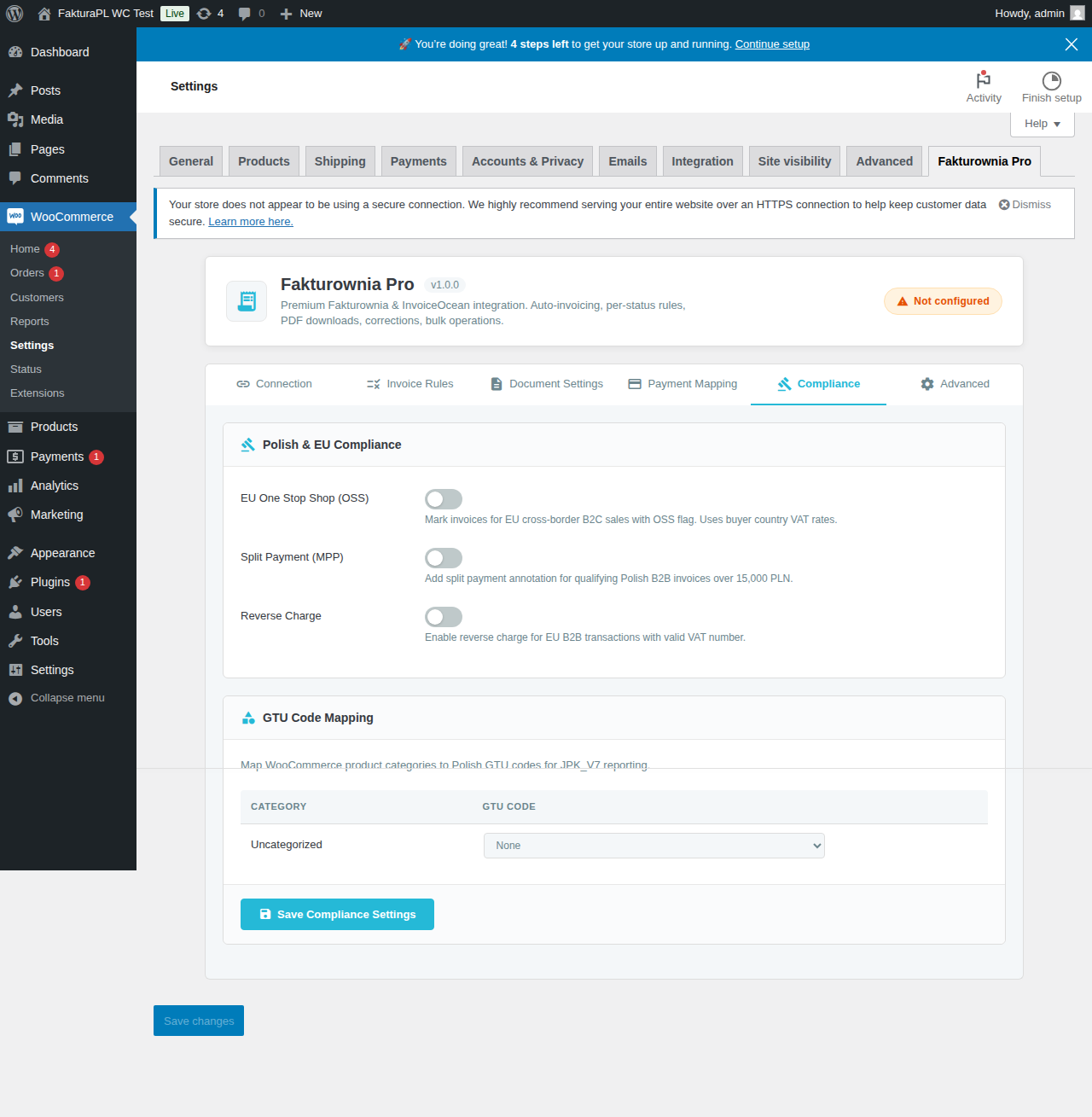
Fakturownia Pro for WooCommerce implements the full suite of Polish tax compliance requirements. All features are configured under WooCommerce → Fakturownia Pro → Compliance.
NIP Field at Checkout
What It Does
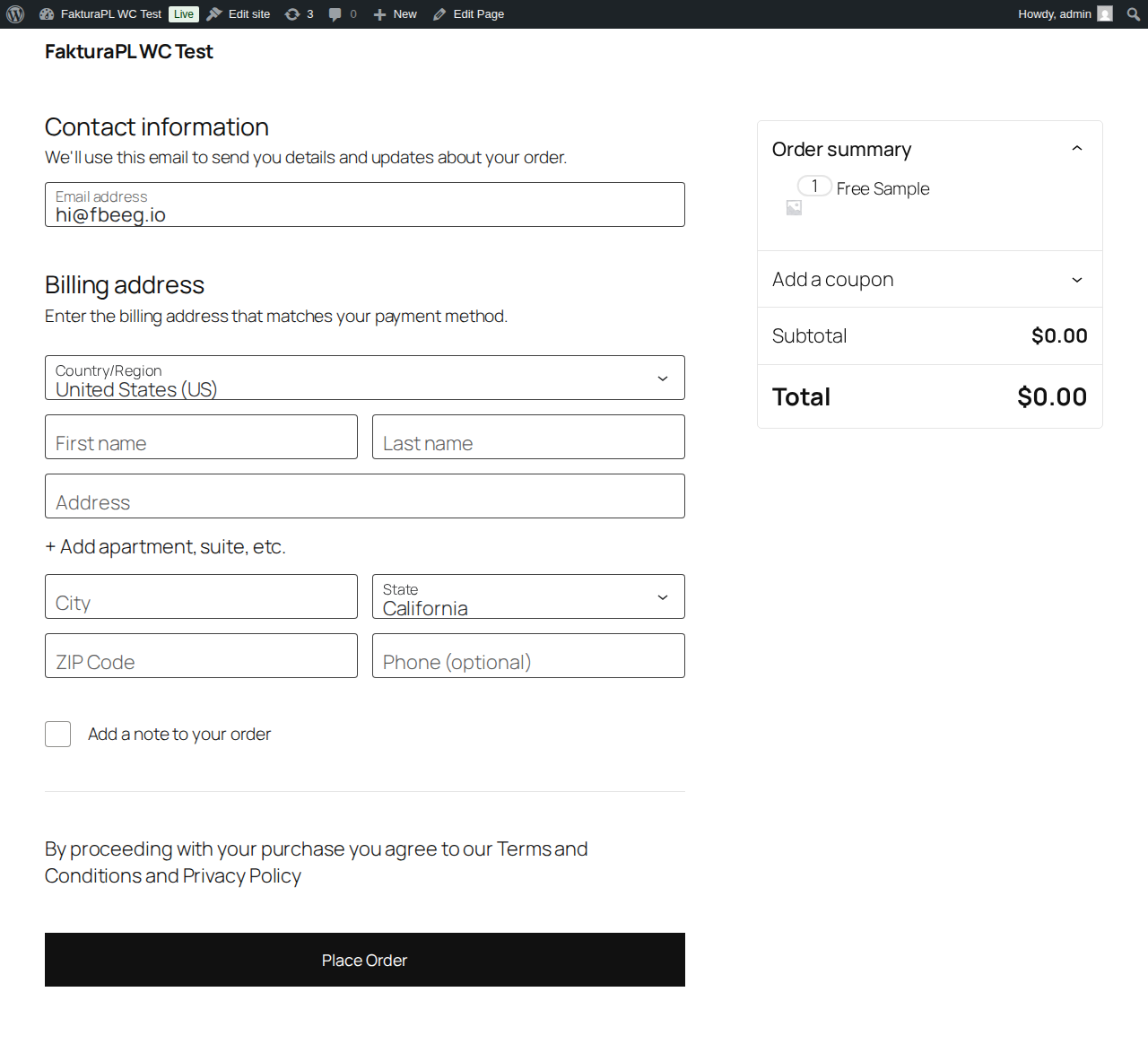
Adds a NIP (Numer Identyfikacji Podatkowej) field to the WooCommerce checkout page, allowing B2B customers to enter their company tax identification number. The NIP is:
- Validated in real time (client-side JavaScript + server-side PHP)
- Stored in order meta as
_billing_nip - Automatically included on generated invoices as the buyer's
tax_nofield - Optionally saved to the customer's account for pre-filling on future orders
Configuration Options
| Option | Default | Description |
|---|---|---|
| Enable NIP field | Off | Show the field at checkout |
| Field label | NIP / Tax ID | Customizable label text |
| Placeholder | 123-456-78-90 | Example format shown in the empty field |
| Required for companies | Off | Make NIP mandatory when billing_company is not empty |
| VIES validation | Off | Cross-check EU VAT numbers against VIES API (adds network request at checkout) |
| Save to customer account | Off | Pre-fill NIP for returning customers from their saved billing address |
| Field position | After Company | Position relative to other billing fields |
NIP Validation Algorithm
Polish NIP validation uses an official checksum algorithm. The plugin validates:
- Format: Exactly 10 digits (dashes are stripped before validation)
- Checksum: Weights are [6, 5, 7, 2, 3, 4, 5, 6, 7] applied to the first 9 digits. The sum modulo 11 must equal the 10th digit. If the modulo result is 10, the NIP is invalid.
- No all-zeros: NIPs like
0000000000are rejected even if the checksum passes
Both client-side (JavaScript) and server-side (PHP) validation run. An order cannot be placed with an invalid NIP when the field is required.
Format accepted at input: The field accepts NIPs with dashes (123-456-78-90 or 123-45-67-890) or without (1234567890). Dashes are stripped before storage and validation.
VIES Validation for EU Companies
When VIES validation is enabled, EU VAT numbers (non-Polish) are cross-checked against the EU VIES database via an API call during checkout. This check:
- Adds approximately 300–800ms to checkout load time
- Can fail silently if VIES is down (the number is accepted as-is and flagged in the compliance log)
- Does not validate Polish NIPs — only EU VAT numbers from other member states
Enable VIES validation only if incorrect EU VAT numbers on invoices would cause significant compliance problems. For most stores, format validation is sufficient.
EU One Stop Shop (OSS)
Overview
The EU OSS scheme applies to WooCommerce stores selling goods or digital services to private consumers (B2C) across EU borders. Under OSS, you collect VAT at the destination country rate and declare it centrally in your home country.
Integration with WooCommerce Tax
Fakturownia Pro does not replace WooCommerce's tax calculation engine. Instead, it reads the tax output. The correct workflow:
- WooCommerce calculates VAT at the destination country rate using your configured tax classes and rates (or a compatible EU VAT plugin like "EU VAT for WooCommerce" or Aelia Currency Switcher's tax module)
- Fakturownia Pro reads the applied rate from the order at invoice generation time
- The invoice is generated with the correct destination country VAT rate and OSS annotation
This means OSS invoices in Fakturownia Pro are only accurate if WooCommerce is correctly calculating destination country VAT. Verify your WooCommerce tax configuration first.
OSS Configuration
| Option | Description | |---|---| | Enable OSS mode | Activate OSS annotation on qualifying invoices | | Store country | Your physical store location — affects which transactions qualify for OSS | | OSS registration country | The EU member state where you filed for OSS (typically Poland) | | Apply to B2C only | Exclude orders where the customer has a valid EU VAT number (those use Reverse Charge) |
When enabled, the plugin sets the tax_kind field in the Fakturownia API payload to oss for qualifying invoices and includes the destination country VAT breakdown.
Split Payment (Mechanizm Podzielonej Płatności — MPP)
Legal Requirement
Polish law mandates MPP annotation on invoices where both conditions are met:
- The gross invoice amount exceeds 15,000 PLN (in PLN or PLN-equivalent)
- The invoice covers goods or services listed in Annex 15 of the Polish VAT Act
What MPP Changes on the Invoice
When MPP applies, Fakturownia Pro sends the split_payment: true flag in the API payload. Fakturownia adds:
- The annotation "mechanizm podzielonej płatności" to the invoice payment notes
- The
split_paymentmarker in the JPK export
The invoice format itself does not change — only the mandatory annotation is added.
Configuration
| Option | Default | Description | |---|---|---| | Enable Split Payment | Off | Activate automatic MPP detection | | PLN threshold | 15,000 | The gross amount above which MPP applies | | Apply to all invoices | Off | Force MPP on every invoice regardless of amount (for stores where all products are in Annex 15) | | Custom MPP note text | Statutory text | Override the annotation text if needed (not recommended — statutory text is legally required) |
Multi-Currency and MPP
Orders in foreign currencies require PLN conversion to determine whether the 15,000 PLN threshold is exceeded. The plugin converts using WooCommerce's stored currency rate at order time. If no rate is stored (common with manual payment gateways), it falls back to the NBP mid-rate fetched at invoice generation time.
GTU Codes (Grupy Towarów i Usług)
Overview
GTU codes identify specific categories of goods and services that require special reporting in JPK_V7 filings. There are 13 codes (GTU_01 through GTU_13). Items not in a specific category are reported without a GTU code.
Full GTU Code Reference
| Code | Category | |---|---| | GTU_01 | Alcoholic beverages (alcohol content above 1.2%) | | GTU_02 | Fuels as specified in Art. 103(5aa) | | GTU_03 | Heating oil, lubricants, and specified chemical products | | GTU_04 | Tobacco products, electronic cigarettes, heated tobacco | | GTU_05 | Waste, secondary raw materials, and recyclables | | GTU_06 | Electronic goods subject to reverse charge: computers, phones, game consoles | | GTU_07 | Vehicles and vehicle parts | | GTU_08 | Precious metals, semi-precious stones, base metals | | GTU_09 | Pharmaceuticals, medical devices, vaccines | | GTU_10 | Buildings, structures, and building land | | GTU_11 | Gas, electricity, heat, and cooling energy | | GTU_12 | Intangible services: IT services, consulting, legal, accounting, advertising | | GTU_13 | Transport and logistics services |
Assigning GTU Codes — Per-Product Method
GTU codes are assigned at the product level using a custom product meta box:
- Navigate to Products → Edit Product
- Scroll to the Fakturownia Pro product meta box in the right sidebar
- Select the applicable GTU code from the dropdown
- Save the product
The GTU code is stored in product meta as _fakturownia_gtu_code. When an invoice is generated, the plugin reads this meta for each line item and includes it in the Fakturownia API payload.
For variable products: GTU codes are assigned at the parent product level and apply to all variations.
Common GTU for software stores: GTU_12 for software licenses, consulting services, and IT services. GTU_06 for physical hardware or electronic devices if sold.
WP-CLI GTU Audit
Check for products missing GTU codes that should have them:
# Find published products with no GTU code assigned
wp fakturownia audit --check=missing-gtu --category="software"
Reverse Charge (Odwrotne Obciążenie)
When It Applies
Reverse Charge applies to intra-EU B2B supplies where:
- The customer is a business in an EU member state other than Poland
- The customer has provided a valid VIES-verified EU VAT number
- The supply is of goods or services subject to the reverse charge mechanism
For software license and IT service stores — the most common WooCommerce B2B use case — reverse charge applies to sales to businesses in Germany, France, the Netherlands, and all other EU member states when the buyer provides their VAT number.
Detection Logic
The plugin applies Reverse Charge when all of the following are true at invoice generation:
- Billing country is EU — not Poland, not non-EU
- Customer has a NIP/VAT number in the order meta (
_billing_nipor_billing_vat_number) - The VAT number passes VIES validation (if VIES validation is enabled; otherwise format check only)
- Order is not flagged as B2C — no B2C override in order meta
Configuration
| Option | Description |
|---|---|
| Enable Reverse Charge | Activate RC logic |
| Scope | All EU B2B, or custom country list |
| RC annotation text | Default: Odwrotne obciążenie / Reverse charge — Art. 44 Directive 2006/112/EC |
| Require VIES validation | Only apply RC to VIES-confirmed VAT numbers (recommended but slows checkout) |
On the Invoice
When Reverse Charge applies, the invoice is generated with:
- All line items at 0% VAT (zw)
- Tax column hidden on PDF
- RC annotation in the invoice description
JPK_V7 Compatibility
All documents generated by the plugin include the metadata required for JPK_V7 export:
- GTU codes per line item
- MPP split payment flag
- Document type markers (
FVfor invoice,ROfor receipt,FPfor pro forma) tpmarker for related-party transactions (if applicable)
Fakturownia's JPK_V7 export function reads these markers automatically. No additional mapping or post-processing is required — export directly from Fakturownia → Reports → JPK → JPK_V7.
WP-CLI Compliance Audit Commands
# Find B2B orders (company field set) missing a NIP
wp fakturownia audit --check=missing-nip --status=completed --date-after=2025-01-01

# Find invoices where MPP should apply but annotation is absent
wp fakturownia audit --check=mpp --date-after=2025-01-01

# Find cross-border EU orders where OSS should apply but does not
wp fakturownia audit --check=oss --date-after=2025-01-01

# Summary compliance report
wp fakturownia audit --summary
These commands query the plugin's stored invoice metadata and flag discrepancies. Run them before each quarterly JPK_VAT submission to catch any gaps in compliance annotation.
Next Steps
- Invoice Rules — configure which statuses trigger invoicing
- Troubleshooting — NIP validation failures, wrong VAT rates
- Configuration — all settings tabs